Category: Trending

  • AI Tools Every Freelancer Should Learn: 12 Best AI Tools for Freelancers in 2026

    AI Tools Every Freelancer Should Learn: 12 Best AI Tools for Freelancers in 2026

    Why AI Is Becoming Essential for Freelancers

    Freelancing has always been about freedom. The ability to choose your clients, set your schedule, and build a career around your skills is what attracts millions of professionals worldwide.

    But that freedom comes with a hidden challenge.

    As a freelancer, you’re not only responsible for delivering client work, you also have to market your services, respond to inquiries, write proposals, manage invoices, organize files, schedule meetings, and handle countless administrative tasks.

    These non-billable activities often consume hours every week.

    This is where artificial intelligence can make a meaningful difference.

    Today’s AI tools aren’t designed to replace your expertise. Instead, they help eliminate repetitive tasks, organize information, and speed up routine processes so you can spend more time doing the work clients actually pay for.

    Whether you’re a writer, designer, developer, marketer, consultant, or virtual assistant, learning how to use AI effectively is becoming a valuable professional skill rather than just a technical advantage.

    Can AI Replace Freelancers?

    The short answer is no, but freelancers who learn AI will likely outperform those who ignore it.

    Clients don’t hire freelancers simply because they can generate text, create images, or write code.

    They hire professionals who can:

    • Understand business problems
    • Think strategically
    • Communicate clearly
    • Make informed decisions
    • Deliver creative solutions
    • Build long-term relationships

    AI can generate drafts, summarize meetings, or suggest ideas, but it cannot replace your experience, judgment, or understanding of a client’s unique goals.

    The most successful freelancers use AI as an assistant, not as a substitute for professional expertise.

    Think of AI as a productivity multiplier. It helps you finish routine work faster so you can dedicate more attention to creativity, problem-solving, and client relationships.

    How to Choose the Right AI Tool

    One of the biggest mistakes freelancers make is signing up for every new AI platform they discover.

    More software doesn’t necessarily mean better productivity.

    Instead, identify your biggest bottleneck first.

    Ask yourself:

    • Do proposals take too long to write?
    • Are meetings consuming too much time?
    • Do you struggle to stay organized?
    • Is content creation slowing down your projects?
    • Do repetitive administrative tasks reduce your billable hours?

    Choose one AI tool that solves your biggest challenge before expanding your toolkit.

    A focused workflow is almost always more effective than juggling dozens of overlapping applications.

    The 12 Best AI Tools Every Freelancer Should Learn

    1. ChatGPT: Best Overall AI Assistant

    Best for:

    • Writing
    • Brainstorming
    • Research
    • Client communication
    • Proposal drafting
    • Content planning

    If there’s one AI tool every freelancer should become comfortable using, it’s ChatGPT.

    Its versatility makes it valuable across almost every profession.

    A freelance writer can generate article outlines, refine headlines, and overcome writer’s block.

    A web developer can troubleshoot code, explain programming concepts, or create technical documentation.

    A digital marketer can brainstorm campaign ideas, write ad copy, and build content calendars.

    Rather than replacing your work, ChatGPT accelerates the first draft, allowing you to spend more time refining ideas and adding your professional expertise.

    Practical Ways Freelancers Use ChatGPT

    • Writing project proposals
    • Creating client emails
    • Brainstorming blog topics
    • Building content strategies
    • Drafting social media posts
    • Summarizing research
    • Explaining technical concepts
    • Generating meeting agendas

    Pro Tip: The quality of ChatGPT’s output depends heavily on the quality of your prompts. Provide context, target audience details, and clear objectives to receive more useful responses.

    2. Canva Magic Studio: Best for Design and Branding

    Best for:

    • Social media graphics
    • Presentations
    • Marketing materials
    • Brand assets
    • Visual content

    Not every freelancer is a professional designer.

    Yet nearly every freelancer needs attractive visuals.

    Canva Magic Studio uses AI to simplify graphic design by generating layouts, resizing content for multiple platforms, removing backgrounds, editing images, and creating branded visuals within minutes.

    This makes it particularly useful for freelancers who manage their own marketing or need to create quick client deliverables without advanced design skills.

    Ideal For

    • Copywriters
    • SEO specialists
    • Consultants
    • Coaches
    • Virtual assistants
    • Social media managers

    Instead of spending hours learning complex design software, freelancers can create polished visuals while maintaining a consistent brand identity.

    3. Notion AI: Best Knowledge Management Tool

    Best for:

    • Project documentation
    • Research
    • Content planning
    • Client notes
    • Personal knowledge base

    As freelance businesses grow, information quickly becomes scattered across emails, documents, spreadsheets, and messaging apps.

    Notion AI helps centralize everything.

    It can summarize lengthy documents, generate meeting notes, organize research, draft content, and quickly locate information stored across your workspace.

    Imagine a client asking about a strategy you discussed six months ago.

    Instead of searching through dozens of folders, you can retrieve the relevant notes within seconds.

    For freelancers managing multiple long-term clients, this alone can save hours every month.

    4. Otter.ai: Best for Meetings and Interviews

    Best for:

    • Client meetings
    • Discovery calls
    • Interviews
    • Webinars
    • Online classes

    Taking notes during a client meeting usually means dividing your attention between listening and typing.

    Otter.ai solves this by automatically recording conversations, generating searchable transcripts, and creating AI-powered meeting summaries.

    Instead of worrying about capturing every detail, you can focus entirely on the conversation.

    After the meeting, you’ll have organized notes, searchable transcripts, and action items ready for review.

    This is especially valuable for:

    • Freelance writers
    • Consultants
    • Virtual assistants
    • Researchers
    • UX professionals
    • Business analysts

    5. ClickUp AI: Best for Managing Multiple Clients

    Best for:

    • Project management
    • Task automation
    • Workflow organization
    • Team collaboration
    • Client tracking

    Managing multiple freelance projects becomes increasingly difficult without a structured system.

    ClickUp AI combines project management with artificial intelligence to automate recurring tasks, summarize project updates, generate documentation, and organize workflows.

    Instead of manually tracking deadlines across different clients, freelancers can centralize everything in one workspace.

    Useful features include:

    • AI-generated task summaries
    • Automatic action items
    • Project documentation
    • Meeting note organization
    • Workflow templates
    • Smart task prioritization

    If you’re consistently juggling several clients at once, ClickUp AI can significantly reduce administrative overhead and help ensure that important deadlines don’t slip through the cracks.

    6. Grammarly: Best for Professional Writing

    Best for:

    • Editing
    • Proofreading
    • Client emails
    • Blog posts
    • Business communication

    Even experienced freelancers make writing mistakes. A small grammar error or awkward sentence in a proposal or client email can affect your professional image.

    Grammarly acts as a real-time writing assistant by checking grammar, spelling, punctuation, clarity, and tone. Its AI suggestions help ensure your communication is polished and easy to understand.

    For freelancers who write daily, Grammarly isn’t just about fixing mistakes—it’s about building trust through clear, professional communication.

    Ideal For

    • Freelance writers
    • Copywriters
    • SEO specialists
    • Consultants
    • Virtual assistants
    • Customer support professionals

    Best Use Cases

    • Editing proposals
    • Proofreading blog posts
    • Improving client emails
    • Refining LinkedIn posts
    • Checking marketing copy

    7. GitHub Copilot: Best for Web Developers

    Best for:

    • Code completion
    • Debugging
    • Learning new frameworks
    • Documentation

    For freelance developers, repetitive coding tasks consume valuable time.

    GitHub Copilot functions as an AI-powered coding assistant that suggests code, explains unfamiliar syntax, generates boilerplate functions, and speeds up software development.

    Instead of searching documentation for every small issue, developers can stay focused on solving client problems.

    It supports many popular programming languages, making it valuable for both beginner and experienced developers.

    Great For

    • Web Developers
    • Software Engineers
    • WordPress Developers
    • Shopify Developers
    • App Developers

    Remember: AI-generated code should always be reviewed and tested before deployment.

    8. Jasper: Best for Marketing Content

    Best for:

    • Marketing copy
    • Landing pages
    • Sales emails
    • Social media campaigns
    • Brand messaging

    While ChatGPT is excellent for general writing, Jasper is built specifically for marketing.

    Its templates help freelancers create conversion-focused content much faster.

    If your freelance services include copywriting, advertising, or content marketing, Jasper can dramatically reduce the time required to create first drafts.

    Useful Projects

    • Facebook Ads
    • Google Ads
    • Product descriptions
    • Landing pages
    • Email campaigns
    • Sales copy

    9. DeepL: Best AI Translation Tool

    Best for:

    • International clients
    • Website translation
    • Business documents
    • Email communication

    Working with international clients is becoming increasingly common.

    DeepL produces natural translations that preserve context and tone, making it an excellent choice for freelancers who collaborate across different languages.

    Instead of relying on literal word-for-word translation, DeepL focuses on meaning, making communication more accurate and professional.

    10. Perplexity AI: Best for Research

    Best for:

    • Research
    • Fact-checking
    • Finding sources
    • Industry insights

    One of the biggest challenges when using AI is verifying information.

    Perplexity AI addresses this by combining conversational AI with web-based citations.

    Rather than simply generating answers, it points you toward supporting sources, making it easier to verify statistics, industry trends, and factual information.

    This makes it particularly valuable for:

    • Content writers
    • Journalists
    • SEO specialists
    • Consultants
    • Researchers

    Always verify important claims with the original source before publishing client work.

    11. Midjourney: Best for Creative Image Generation

    Best for:

    • Concept art
    • Mood boards
    • Marketing visuals
    • Creative inspiration

    Sometimes clients need visual ideas before a designer begins the final work.

    Midjourney excels at generating high-quality concept images from text prompts.

    Rather than replacing graphic designers, it helps speed up brainstorming and visual exploration.

    Many designers use Midjourney to:

    • Explore design directions
    • Create inspiration boards
    • Generate presentation visuals
    • Pitch creative concepts

    Final brand assets should still be refined using professional design tools.

    12. Zapier AI: Best for Workflow Automation

    Best for:

    • Automating repetitive tasks
    • Connecting apps
    • Saving administrative time

    Freelancers often switch between dozens of applications every day.

    Instead of manually copying information from one platform to another, Zapier connects your favorite apps and automates repetitive workflows.

    Examples include:

    • Save Gmail attachments directly to Google Drive
    • Create ClickUp tasks from new emails
    • Add website leads to your CRM automatically
    • Send Slack notifications for completed projects
    • Back up client files automatically

    Even small automations can save several hours every month.

    AI Tool Comparison (Quick Overview) 

    ToolBest ForIdeal Users
    ChatGPTWriting, brainstorming, research, proposalsAll freelancers
    Canva Magic StudioGraphic design, branding, social media visualsDesigners, marketers, consultants, creators
    Notion AIKnowledge management, documentation, content planningWriters, consultants, agencies
    Otter.aiMeeting transcription, interviews, note-takingWriters, researchers, virtual assistants
    ClickUp AIProject management, workflow automationFreelancers managing multiple clients
    GrammarlyEditing, proofreading, professional communicationWriters, copywriters, consultants
    GitHub CopilotCode completion, debugging, programmingWeb developers, software engineers
    JasperMarketing copy, ads, sales contentCopywriters, marketers, agencies
    DeepLTranslation and multilingual communicationInternational freelancers, translators
    Perplexity AIResearch, fact-checking, source discoverySEO specialists, journalists, researchers
    MidjourneyAI image generation, creative conceptsGraphic designers, illustrators, marketers
    Zapier AIWorkflow automation and app integrationVirtual assistants, consultants, business owners

    Best AI Stack by Freelancer Type 

    Choosing the right combination of AI tools depends on your profession. 

    Freelancer TypeRecommended AI Stack
    WriterChatGPT + Grammarly + Perplexity + Notion AI
    Graphic DesignerCanva Magic Studio + Midjourney + ChatGPT
    Web DeveloperGitHub Copilot + ChatGPT + ClickUp AI
    Digital MarketerJasper + Canva + ChatGPT + Notion AI
    SEO SpecialistChatGPT + Perplexity + Grammarly + ClickUp AI
    Virtual AssistantOtter.ai + ClickUp AI + Zapier + ChatGPT

    Free vs Paid AI Tools 

    ToolFree PlanPaid Version Worth It?
    ChatGPT✅ YesYes, for advanced models and higher limits
    Canva✅ YesYes, for premium assets and AI features
    Grammarly✅ YesYes, for advanced writing suggestions
    Notion AILimitedYes, for frequent users
    Otter.ai✅ YesYes, if you attend many meetings
    GitHub CopilotTrialYes, for professional developers
    Perplexity✅ YesOptional, depending on research needs

    Our Take: ChatGPT is the best starting point for freelancers who want one versatile AI assistant without learning multiple platforms.

    Common Mistakes Freelancers Make with AI

    AI is powerful, but only when used wisely. Avoid these common mistakes:

    Using AI Without Editing

    Clients pay for your expertise, not AI-generated text. Always review, personalize, and improve AI outputs.

    Copying Content Blindly

    Never publish AI-generated content without checking:

    • Facts
    • Tone
    • Grammar
    • Originality

    Ignoring Privacy

    Avoid uploading confidential client information into AI tools unless you’re confident about the platform’s privacy and data handling policies.

    Using Too Many Tools

    More software usually creates more complexity. Master one tool before adding another.

    A Simple 30-Day AI Learning Plan

    Instead of trying everything at once, build your AI workflow gradually.

    Week 1

    • Learn ChatGPT
    • Practice writing better prompts
    • Use it daily

    Week 2

    Add:

    • Canva Magic Studio
    • Grammarly

    Improve content creation.

    Week 3

    Introduce:

    • Notion AI
    • ClickUp AI

    Organize projects and documentation.

    Week 4

    Experiment with:

    • Otter.ai
    • Perplexity
    • Zapier

    Automate meetings, research, and repetitive workflows.

    By the end of one month, you’ll have a practical AI toolkit that supports your business without overwhelming your workflow.

    Final Thoughts

    Artificial intelligence is changing the freelance landscape, but it isn’t replacing skilled professionals. Instead, it’s giving freelancers the opportunity to spend less time on repetitive work and more time delivering the expertise that clients truly value.

    The goal isn’t to use every AI tool available. It’s to build a focused toolkit that supports your workflow, improves efficiency, and helps you deliver consistent, high-quality results.

    If you’re just getting started, begin with ChatGPT, then gradually add tools like Canva Magic Studio, Notion AI, Otter.ai, or ClickUp AI based on your needs. Over time, you’ll create a streamlined workflow that saves hours each week while allowing you to focus on creativity, strategy, and client relationships.

    Freelancers who treat AI as a productivity partner, not a replacement for their expertise, will be better positioned to adapt, grow, and thrive in the years ahead.

    Key Takeaways

    • AI helps freelancers automate repetitive tasks while preserving creative control.
    • Start with one AI tool that solves your biggest bottleneck instead of adopting many at once.
    • ChatGPT remains the most versatile AI assistant for most freelance professionals.
    • Different roles require different AI stacks—choose tools based on your workflow.
    • Always review AI-generated content for accuracy, originality, and tone before sharing it with clients.
    • The greatest value of AI isn’t replacing your work—it’s giving you more time to focus on high-impact tasks that grow your freelance business.
  • Essential Software Every Freelancer Needs for Maximum Productivity

    Essential Software Every Freelancer Needs for Maximum Productivity

    Freelancing gives you the freedom to choose your clients, set your own schedule, and work from almost anywhere. But unlike traditional employees, freelancers are responsible for every aspect of running a business, not just delivering their services.

    On any given day, you may need to:

    • Manage multiple client projects
    • Track billable hours
    • Send invoices
    • Follow up on payments
    • Schedule meetings
    • Store important files
    • Communicate with clients
    • Handle contracts
    • Market your services

    Trying to manage all of this manually quickly becomes overwhelming. Important tasks slip through the cracks, deadlines get missed, invoices are delayed, and valuable time is lost on repetitive administrative work.

    The right software transforms your freelance business into an organized, efficient system. Instead of juggling spreadsheets and scattered notes, you can centralize your workflow, automate routine tasks, and focus more on delivering exceptional work for your clients.

    Whether you’re just starting your freelance journey or managing a growing portfolio of clients, investing in the right software is one of the smartest decisions you can make.

    Our Experience

    After testing and analyzing various productivity tools, we found that freelancers don’t need dozens of apps. A simple stack of well-integrated tools can help manage projects, save time, improve client relationships, and build a more efficient freelance business.

    How We Selected the Best Software

    There are hundreds of tools available for freelancers, but not all of them are worth your time or money.

    For this guide, each recommendation was evaluated based on the following criteria:

    • Ease of use for beginners and professionals
    • Productivity improvements
    • Free plan or affordable pricing
    • Integration with popular tools
    • Reliability and customer support
    • Scalability as your freelance business grows
    • Reputation and widespread adoption

    Rather than recommending dozens of similar tools, we’ve focused on software that consistently delivers value across different freelance professions.

    1. Project Management Software

    Managing projects with emails and sticky notes may work when you have one client—but it quickly becomes chaotic as your workload grows.

    Project management software helps you organize tasks, monitor deadlines, collaborate with clients, and keep every project moving forward.

    Top Recommendations

    SoftwareBest ForFree Plan
    NotionAll-in-one workspace
    ClickUpPowerful project management
    TrelloSimple Kanban boards
    AsanaTeam collaboration

    Notion

    Notion combines note-taking, task management, databases, documentation, and project tracking into a single workspace. It is ideal for freelancers who prefer managing everything from one platform.

    Best for:

    • Writers
    • Designers
    • Consultants
    • Solo freelancers

    Pros

    • Highly customizable
    • Client portals
    • Content calendars
    • Knowledge base
    • Templates

    Cons

    • Learning curve for beginners

    ClickUp

    ClickUp is one of the most feature-rich productivity platforms available.

    It includes:

    • Tasks
    • Goals
    • Documents
    • Whiteboards
    • Time tracking
    • AI features
    • Dashboards

    If your freelance business is growing, ClickUp can replace several separate apps.

    Trello

    Trello uses a visual Kanban board that makes project tracking incredibly simple. It’s perfect if you want a clean interface without unnecessary complexity.

    Ideal for:

    • New freelancers
    • Small projects
    • Content planning

    Asana

    Asana excels when working with agencies or clients that require collaborative workflows.

    Features include:

    • Timeline view
    • Calendar view
    • Task dependencies
    • Team collaboration
    • Workflow automation

    Our Recommendation

    • Beginners: Trello
    • Most Freelancers: Notion
    • Power Users: ClickUp
    • Small Teams: Asana

    2. Time Tracking Software

    One of the biggest mistakes freelancers make is underestimating how much time they spend on projects.

    Without accurate time tracking, you may:

    • Undercharge clients
    • Miss billable hours
    • Overwork yourself
    • Miscalculate project profitability

    Time tracking software provides clear insights into where your hours go, helping you improve pricing, productivity, and work-life balance.

    Best Time Tracking Tools

    SoftwareBest ForFree Plan
    Toggl TrackOverall
    ClockifyUnlimited tracking
    HarvestBilling + invoices

    Toggl Track

    Toggl Track is known for its clean interface and ease of use.

    Key features include:

    • One-click timers
    • Reports
    • Project tracking
    • Team collaboration
    • Integrations with project management tools

    Clockify

    Clockify offers one of the most generous free plans available.

    It’s ideal for freelancers who need:

    • Unlimited projects
    • Unlimited tracking
    • Detailed reports
    • Team support

    Harvest

    Harvest combines:

    • Time tracking
    • Expense management
    • Invoicing
    • Budget monitoring

    This makes it particularly useful for freelancers who bill by the hour.

    Our Recommendation

    • Best Overall: Toggl Track
    • Best Free Option: Clockify
    • Best for Agencies: Harvest

    3. Communication & Collaboration Tools

    Professional communication builds trust with clients.

    Instead of relying solely on email, modern freelancers use dedicated collaboration tools for messaging, meetings, and file sharing.

    Recommended Communication Tools

    SoftwareBest For
    SlackDaily communication
    ZoomVideo meetings
    Google MeetSimple client calls

    Slack

    Slack keeps conversations organized through channels instead of endless email threads.

    Benefits include:

    • Instant messaging
    • File sharing
    • Integrations
    • Voice calls
    • Workflow notifications

    Zoom

    Zoom remains one of the most reliable video conferencing platforms.

    Perfect for:

    • Discovery calls
    • Client presentations
    • Workshops
    • Team meetings

    Google Meet

    If you already use Google Workspace, Google Meet offers seamless integration with Gmail and Google Calendar.

    No additional software installation is required for most meetings.

    Best Choice

    • Internal communication: Slack
    • Professional meetings: Zoom
    • Quick client calls: Google Meet

    4. Invoicing & Payment Software

    Getting paid on time is just as important as delivering great work.

    Professional invoicing software helps you:

    • Create branded invoices
    • Automate recurring invoices
    • Track payments
    • Send reminders
    • Accept online payments
    SoftwareBest For
    FreshBooksAll-in-one invoicing
    WaveFree accounting & invoices
    Zoho InvoiceBudget-conscious freelancers
    PayPalGlobal payments
    WiseLow-cost international transfers

    FreshBooks

    FreshBooks is built specifically for freelancers and service-based businesses.

    It combines:

    • Proposals
    • Invoices
    • Expense tracking
    • Time tracking
    • Financial reports

    Making it an excellent all-in-one solution.

    Wave

    Wave is one of the best free tools for freelancers who need professional invoicing alongside basic accounting features.

    It’s especially attractive for new freelancers looking to minimize software costs while maintaining a polished billing process.

    PayPal & Wise

    For international freelancers, choosing the right payment platform can significantly impact both convenience and transaction costs.

    • PayPal is widely accepted and easy for clients to use, making it a popular choice for receiving payments from around the world.
    • Wise offers competitive exchange rates and lower international transfer fees, making it ideal for freelancers who regularly work with overseas clients.

    Pro Tip: Offer multiple payment options whenever possible. Giving clients flexibility can reduce payment delays and create a smoother billing experience.

    5. Accounting Software

    Managing your finances is just as important as finding new clients. Without proper accounting software, it’s easy to lose track of expenses, overlook tax deductions, or struggle to understand whether your freelance business is truly profitable.

    Good accounting software helps you:

    • Track income and expenses
    • Categorize business costs
    • Generate financial reports
    • Prepare for tax season
    • Monitor cash flow
    • Reduce bookkeeping errors

    Best Accounting Software for Freelancers

    SoftwareBest ForFree Plan
    WaveBeginners & Free Accounting
    QuickBooksGrowing Businesses
    FreshBooksService-Based Freelancers
    XeroAdvanced Accounting

    Wave

    Wave is one of the best free accounting solutions available for freelancers. It includes invoicing, expense tracking, and financial reporting without a monthly subscription, making it an excellent choice for beginners.

    QuickBooks

    QuickBooks is ideal once your freelance income starts growing. It offers detailed reports, tax preparation tools, bank synchronization, and expense categorization that save hours of manual bookkeeping.

    Xero

    If you work with an accountant or manage multiple revenue streams, Xero provides advanced accounting features with a clean interface.

    Recommendation

    • Beginners: Wave
    • Growing Freelancers: QuickBooks
    • Advanced Users: Xero

    6. Cloud Storage & File Sharing

    Freelancers exchange contracts, designs, videos, documents, and project files every day. Keeping these files secure and accessible is essential.

    Cloud storage offers:

    • Automatic backups
    • File sharing
    • Version history
    • Cross-device access
    • Client collaboration
    SoftwareBest For
    Google DriveOverall
    DropboxFile Synchronization
    OneDriveMicrosoft Users

    Google Drive

    Google Drive integrates seamlessly with Google Docs, Sheets, and Slides, making collaboration effortless. It’s suitable for almost every freelancer.

    Dropbox

    Dropbox remains one of the most reliable solutions for syncing files across multiple devices and sharing large files with clients.

    OneDrive

    If your workflow revolves around Microsoft Office, OneDrive is a natural choice with built-in integration across Word, Excel, and PowerPoint.

    Best Choice

    For most freelancers, Google Drive offers the best balance of storage, collaboration, and ease of use.

    7. AI Productivity Tools

    Artificial Intelligence is no longer optional for freelancers. Used responsibly, AI tools can help you complete repetitive tasks faster, brainstorm ideas, improve writing, summarize research, and increase productivity without replacing your expertise.

    Best AI Tools

    ToolBest For
    ChatGPTWriting, Research, Brainstorming
    ClaudeLong-form Writing & Analysis
    Google GeminiGoogle Workspace Users
    Perplexity AIResearch & Fact Checking
    GrammarlyGrammar & Editing

    ChatGPT

    ChatGPT can help freelancers:

    • Draft proposals
    • Generate outlines
    • Brainstorm ideas
    • Write emails
    • Explain technical topics
    • Create first drafts

    Remember to review and personalize AI-generated content before sending it to clients.

    Claude

    Claude excels at long-form writing, detailed analysis, and organizing complex information into clear, readable content.

    Google Gemini

    Gemini integrates naturally with Google Workspace, making it useful for freelancers who already use Gmail, Docs, and Drive.

    Perplexity AI

    Perplexity combines AI-generated answers with cited sources, making it especially useful for research and fact-checking.

    Grammarly

    Grammarly checks grammar, spelling, clarity, and tone, helping freelancers communicate more professionally.

    Pro Tip: Let AI handle repetitive tasks while you focus on creativity, critical thinking, and client relationships.

    8. CRM & Client Management Software

    As your client list grows, remembering conversations, follow-ups, invoices, and project status becomes increasingly difficult.

    A Customer Relationship Management (CRM) system keeps everything organized in one place.

    Benefits

    • Store client information
    • Track conversations
    • Schedule follow-ups
    • Monitor project status
    • Improve client retention

    Recommended CRM Software

    SoftwareBest For
    HubSpot CRMOverall
    Notion CRMCustom Workflows
    Zoho CRMGrowing Businesses

    HubSpot CRM

    HubSpot offers one of the most generous free CRM plans available, making it ideal for freelancers who want professional client management without additional costs.

    Notion CRM

    Many freelancers build lightweight CRMs inside Notion using databases, allowing complete customization without switching platforms.

    Zoho CRM

    Zoho becomes valuable once your freelance business expands into a small agency with more complex sales pipelines.

    9. Automation Tools

    Manual work consumes valuable hours every week. Automation tools eliminate repetitive tasks, allowing you to spend more time on client work and business growth.

    Best Automation Software

    ToolBest For
    ZapierApp Automation
    MakeAdvanced Workflows
    IFTTTSimple Personal Automation

    Examples include:

    • Automatically saving email attachments to Google Drive
    • Sending Slack notifications when a client submits a form
    • Creating tasks from calendar events
    • Updating spreadsheets automatically
    • Backing up important documents

    Even small automations can save hours every month.

    Free vs. Paid Software

    One of the biggest questions freelancers ask is whether free software is enough.

    The answer depends on your business stage.

    Business StageRecommendation
    BeginnerMostly Free Tools
    Growing FreelancerMix of Free & Paid
    Established ProfessionalPremium Software Stack

    Start with Free Tools

    If you’re new to freelancing, you don’t need expensive software immediately.

    A solid free toolkit includes:

    • Notion
    • Trello
    • Clockify
    • Google Drive
    • Wave
    • Slack
    • Google Meet
    • ChatGPT Free
    • Grammarly Free

    Upgrade only when a premium feature saves more time than it costs.

    Best Software Stack by Freelancer Type

    Writers

    • Notion
    • Grammarly
    • ChatGPT
    • Google Docs
    • Wave

    Designers

    • Adobe Creative Cloud
    • Canva
    • Figma
    • Google Drive
    • Trello

    Developers

    • GitHub
    • Visual Studio Code
    • ClickUp
    • Clockify
    • ChatGPT

    Digital Marketers

    • Notion
    • Canva
    • Google Analytics
    • Buffer
    • ChatGPT

    Virtual Assistants

    • ClickUp
    • Slack
    • Google Workspace
    • Calendly
    • Zoom

    Common Mistakes to Avoid

    Many freelancers invest in too many tools too quickly.

    Avoid these common mistakes:

    • Paying for software you rarely use
    • Using multiple apps for the same purpose
    • Ignoring integrations
    • Not backing up important files
    • Choosing complicated software with unnecessary features
    • Forgetting to review subscriptions regularly

    Start with the essentials and expand your toolkit as your business grows.

    Key Takeaways

    • The right software helps freelancers save time, stay organized, and deliver a better client experience.
    • Start with essential categories: project management, time tracking, communication, invoicing, accounting, cloud storage, AI, CRM, and automation.
    • Free tools are often sufficient when you’re starting out.
    • Upgrade strategically as your business grows and your workflow becomes more complex.
    • Choose tools that integrate well to create a streamlined, efficient freelance tech stack.
    • Review your software regularly and remove subscriptions that no longer provide value.

    Build a Smarter Freelance Business

    Your skills may win clients, but your systems determine how efficiently you serve them. By choosing the right software and building a streamlined workflow, you’ll spend less time on administrative tasks and more time doing high-value work that grows your freelance business.
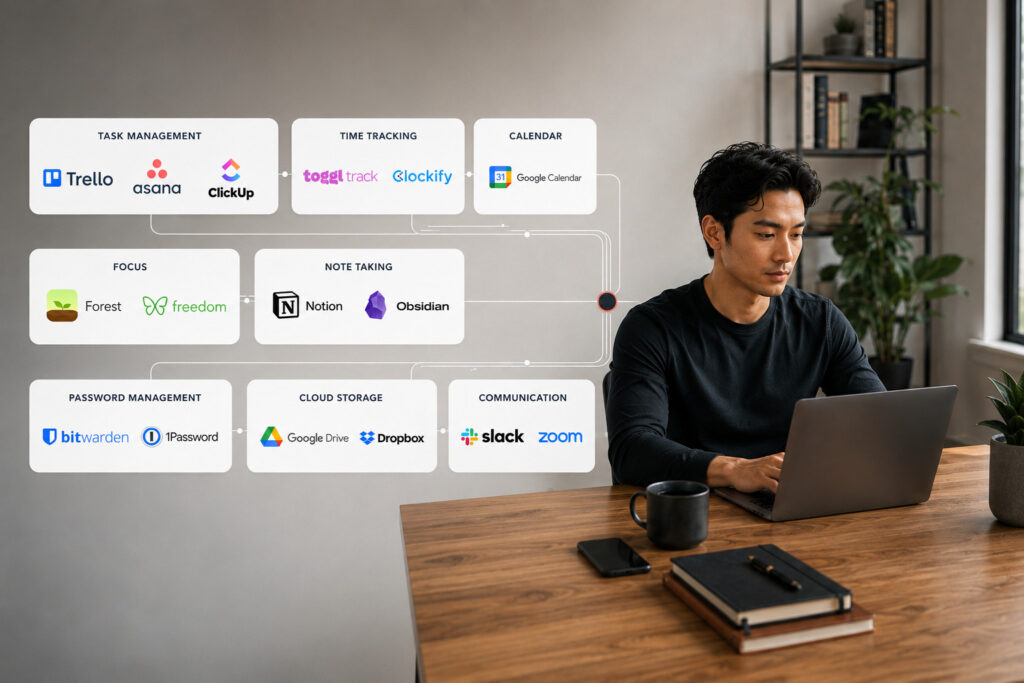
    Start simple, automate where it makes sense, and invest in tools that genuinely improve your productivity. Over time, the right software stack becomes more than a collection of apps, it becomes the foundation of a sustainable, professional, and profitable freelance career.

  • Best Budgeting Method for Freelancers: A Complete Guide

    Best Budgeting Method for Freelancers: A Complete Guide

    Freelancing offers freedom, flexibility, and unlimited earning potential, but it also comes with one major challenge: irregular income.

    Unlike salaried employees who receive a predictable paycheck every month, freelancers often experience cycles of feast and famine. One month may bring multiple high-paying clients, while the next could be unexpectedly quiet. Without a solid budgeting system, this income volatility can quickly lead to financial stress, late bill payments, mounting debt, and missed business opportunities.

    That’s why learning the best budgeting method for freelancers isn’t just a financial skill, it’s a business survival strategy.

    A well-designed freelance budget helps you:

    • Manage unpredictable income with confidence
    • Cover personal and business expenses consistently
    • Save for taxes before they become a problem
    • Build an emergency fund for slow months
    • Invest in your freelance business without overspending
    • Reduce financial anxiety while growing long-term wealth


    In this guide, you’ll learn the most effective budgeting methods for freelancers, compare popular budgeting frameworks like Zero-Based Budgeting, the 50/30/20 Rule, and the Profit First Method, and discover practical strategies for managing variable income, tracking expenses, and building lasting financial stability.

    Whether you’re just starting your freelance journey or looking to improve your money management skills, this guide will help you build a budgeting system that supports both your personal life and your business.

    Quick Answer

    The best budgeting method for freelancers is one that prioritizes essential expenses, taxes, savings, and business costs while accommodating irregular income. For most freelancers, Zero-Based Budgeting combined with an Emergency Fund and Profit First principles provides the greatest financial stability because every dollar has a purpose before it’s spent.

    Why Budgeting Is Different for Freelancers

    A concerned freelancer analyzing financial charts and managing variable income fluctuations.
    Freelance Irregular Income Challenge

    Traditional employees usually receive a fixed salary on a regular schedule. Freelancers don’t have that luxury.

    Your monthly income can fluctuate due to:

    • Seasonal demand
    • Client payment delays
    • Project-based work
    • Changing workloads
    • Losing or gaining clients
    • Market conditions

    For example, imagine earning:

    MonthIncome
    January$6,500
    February$3,100
    March$8,200
    April$4,000

    Even though your average income is healthy, spending as if every month will be like March could leave you struggling during April.

    This is why freelancers should budget based on cash flow, not optimism.

    Why Every Freelancer Needs a Budget

    Budgeting isn’t about restricting your spending—it’s about making intentional financial decisions. A good freelance budget helps you:

    1. Handle Irregular Income

    Instead of reacting to income changes, you prepare for them in advance.

    2. Prevent Overspending

    High-income months often tempt freelancers to spend more than they should.

    A budget ensures those extra earnings are allocated wisely toward savings, taxes, or future business investments instead of unnecessary purchases.

    3. Prepare for Taxes

    Unlike traditional employees, freelancers are responsible for managing their own taxes.

    Without budgeting, tax season can become an expensive surprise.

    4. Build an Emergency Fund

    Every freelancer experiences slow periods.

    A healthy emergency fund allows you to continue paying bills without accepting low-paying work out of desperation.

    5. Improve Cash Flow

    Budgeting helps you know:

    • how much money is coming in,
    • how much is going out,
    • and how much you actually have available.

    Better visibility leads to better decisions.

    6. Grow Your Business

    Financial stability allows you to invest in:

    Instead of surviving month to month, you begin building a sustainable freelance business.

    Common Budgeting Mistakes Freelancers Make

    Many freelancers don’t fail because they earn too little, they struggle because they manage their money inconsistently.

    Here are the most common budgeting mistakes to avoid:

    1. Treating Every Month Like a High-Income Month

    Spending based on your best month instead of your average month often leads to financial stress when work slows down.

    Always create your budget using a conservative income estimate.

    2. Mixing Personal and Business Finances

    Using one bank account for everything makes it difficult to:

    • track expenses,
    • calculate taxes,
    • monitor profitability,
    • and understand your true cash flow.

    Keeping separate accounts improves financial organization and simplifies bookkeeping.

    3. Ignoring Business Expenses

    Many freelancers forget to budget for recurring business costs such as:

    • Software subscriptions
    • Website hosting
    • Internet
    • Marketing
    • Professional development
    • Equipment upgrades
    • Accounting services

    These expenses should be planned, not treated as unexpected costs.

    4. Forgetting About Taxes

    One of the fastest ways to create financial problems is spending money that technically belongs to the tax authority. Set aside a percentage of every payment as soon as it arrives.

    5. Having No Emergency Fund

    Freelancing naturally involves income gaps. Without savings, even a delayed client payment can disrupt your finances. Aim to build an emergency fund covering three to six months of essential living expenses.

    Characteristics of the Best Budgeting Method for Freelancers

    Before choosing a budgeting system, understand what makes one effective for freelance work.

    The best budgeting method should:

    • Work with irregular income
    • Prioritize essential expenses
    • Separate business and personal finances
    • Include tax savings
    • Build emergency reserves
    • Encourage consistent investing and saving
    • Be simple enough to maintain every month
    • Scale as your freelance business grows

    No single budgeting framework is perfect for everyone.

    The goal is to choose a system that matches your work style, income patterns, and financial goals.

    The 5 Best Budgeting Methods for Freelancers

    1. Zero-Based Budgeting (Best Overall)

    Best for: Most freelancers with variable income

    Zero-Based Budgeting assigns every dollar of income a specific purpose before you spend it.

    At the end of the budgeting process:

    Income − Expenses − Savings − Investments = $0

    This doesn’t mean you spend every dollar, it means every dollar is intentionally assigned to categories like bills, taxes, savings, debt repayment, or business investments.

    Why It Works Well for Freelancers

    Since freelance income changes from month to month, Zero-Based Budgeting allows you to create a fresh budget based on the money you actually receive rather than what you expect to earn.

    This flexibility makes it especially effective for managing variable income while avoiding unnecessary spending.

    Benefits of Zero-Based Budgeting

    • Excellent for irregular income
    • Prevents impulse spending
    • Improves cash flow awareness
    • Encourages intentional saving
    • Works well with digital budgeting tools
    • Helps freelancers maximize every dollar earned

    Example

    Suppose you earn $5,000 this month.

    Instead of spending freely, you assign every dollar before the month begins:

    CategoryAmount
    Housing & Utilities$1,500
    Food$500
    Transportation$300
    Business Expenses$700
    Taxes$1,000
    Emergency Fund$500
    Entertainment$300
    Savings & Investments$200
    Total$5,000

    Every dollar has a purpose, leaving no unplanned spending. 

    2. The 50/30/20 Budget Rule (Best for Beginners)

    Best for: Freelancers with relatively stable income or those new to budgeting.

    The 50/30/20 Rule is one of the simplest budgeting methods available. It divides your after-tax income into three categories:

    • 50% for Needs
    • 30% for Wants
    • 20% for Savings and Debt Repayment

    Although originally designed for people with regular salaries, freelancers can easily adapt it by adjusting the percentages during high- and low-income months.

    Example

    If your after-tax income is $4,000, your budget could look like this:

    CategoryPercentageAmount
    Needs50%$2,000
    Wants30%$1,200
    Savings & Debt20%$800

    During a high-income month, you might increase your savings to 30–40% instead of spending the extra money. 

    Pros

    Easy to understand

    Great for beginners

    Promotes balanced spending

    Encourages regular saving

    Cons

    Doesn’t automatically account for business expenses

    Less effective when income changes dramatically each month

    3. Profit First Method (Best for Business Growth)

    Best for: Full-time freelancers and established self-employed professionals.

    Created by entrepreneur Mike Michalowicz, the Profit First Method flips traditional budgeting on its head.

    Instead of following this formula:

    Income − Expenses = Profit

    It recommends:

    Income − Profit = Expenses

    In other words, you pay yourself first before spending on your business. A common allocation might look like this:

    CategoryPercentage
    Profit10%
    Owner’s Pay50%
    Taxes15%
    Business Expenses25%

    (Your percentages may vary depending on your business stage.)

    Why It Works

    Many freelancers spend everything left after paying expenses and wonder why they never build savings.

    The Profit First system ensures that profit becomes a priority, not an afterthought.

    Pros

    • Encourages profitability
    • Prevents overspending
    • Makes tax planning easier
    • Improves long-term financial health

    Cons

    • Requires multiple bank accounts
    • Takes time to build the habit

    4. Pay Yourself First Budgeting (Best for Building Savings)

    Best for: Freelancers who struggle to save consistently.

    With this method, the first money leaving your account goes toward your future, not your spending.

    Every time a client pays you:

    • Transfer money to savings
    • Set aside taxes
    • Contribute to investments
    • Fund your emergency account

    Only then do you budget for monthly expenses.

    Example

    You receive a payment of $3,000. Immediately allocate:

    • $300 → Emergency Fund
    • $750 → Taxes
    • $200 → Retirement Savings

    Now budget the remaining $1,750 for your expenses.

    This simple habit helps freelancers build wealth consistently, regardless of income fluctuations.

    5. Hybrid Budgeting Method (Recommended for Most Freelancers)

    No single budgeting framework works perfectly for every freelancer.

    Many experienced freelancers combine the strengths of several methods.

    A practical hybrid approach might look like this:

    1. Use Zero-Based Budgeting every month.
    2. Apply Profit First to separate taxes and profit.
    3. Follow Pay Yourself First for savings.
    4. Use the 50/30/20 Rule as a spending guideline.

    This combination provides flexibility, financial discipline, and long-term stability.

    Which Budgeting Method Is Best?

    Budgeting MethodBest ForDifficulty
    Zero-Based BudgetingMost freelancers⭐⭐⭐
    50/30/20 RuleBeginners
    Profit FirstGrowing freelance businesses⭐⭐⭐⭐
    Pay Yourself FirstSaving money⭐⭐
    Hybrid MethodExperienced freelancers⭐⭐⭐

    For most freelancers, Zero-Based Budgeting combined with Profit First principles offers the best balance of flexibility, control, and financial security.

    How to Budget with Irregular Income

    Variable income doesn’t mean you can’t have a predictable budget.

    Follow these practical strategies:

    Budget Using Your Lowest Expected Income

    Instead of planning around your highest-earning month, create your budget using the minimum amount you expect to earn.

    If you usually earn between $3,000 and $6,000, build your budget around $3,000.

    Any additional income becomes an opportunity to save, invest, or grow your business.

    Calculate Your Average Monthly Income

    Review your last 6–12 months of earnings. Example:

    MonthIncome
    January$4,800
    February$3,700
    March$5,600
    April$4,900
    May$3,900
    June$5,100

    Average Monthly Income:

    $28,000 ÷ 6 = $4,667

    This average provides a more realistic baseline than relying on your best or worst month alone.

    Separate Business and Personal Finances

    Mixing business and personal money makes budgeting far more difficult.

    Maintain:

    • One business checking account
    • One personal checking account
    • One tax savings account
    • One emergency savings account

    This structure improves expense tracking, tax preparation, and financial clarity.

    Build a Three-to-Six Month Emergency Fund

    An emergency fund protects you from:

    • Slow seasons
    • Late client payments
    • Unexpected medical bills
    • Equipment failures
    • Economic downturns

    Aim to save three to six months of essential living expenses before making major discretionary purchases.

    Budget for Taxes Every Month

    Taxes aren’t optional, and freelancers are responsible for planning ahead.

    A practical rule of thumb is to set aside 25–30% of every client payment in a separate account.

    This habit reduces stress and helps avoid cash-flow problems when tax payments are due.

    Best Budgeting Apps for Freelancers

    The right software can simplify budgeting and automate many financial tasks.

    AppBest For
    YNAB (You Need A Budget)Zero-Based Budgeting
    Monarch MoneyPersonal budgeting
    QuickBooksAccounting and bookkeeping
    FreshBooksFreelance invoicing
    WaveFree accounting
    EveryDollarSimple budgeting
    NotionCustom budget tracking
    Google SheetsFree budget templates

    Choose a tool that matches your workflow. Consistency matters more than complexity.

    Pro Tips for Better Freelance Budgeting

    • Review your budget at least once a month.
    • Track every expense, no matter how small.
    • Raise your rates as your experience grows.
    • Diversify your income sources to reduce financial risk.
    • Invoice clients promptly and define clear payment terms.
    • Build a financial buffer during high-income months.
    • Avoid lifestyle inflation when your income increases.
    • Reinvest strategically in tools, education, and marketing that generate long-term returns.

    Take Control of Your Freelance Finances 

    Freelancing gives you the freedom to design your career, but that freedom comes with the responsibility of managing your finances wisely.

    The best budgeting method for freelancers isn’t necessarily the most complicated one, it’s the one you’ll use consistently. Whether you prefer Zero-Based Budgeting, the 50/30/20 Rule, Profit First, or a hybrid approach, the goal is the same: take control of your money before your money controls you.

    By planning for irregular income, separating business and personal finances, saving for taxes, building an emergency fund, and reviewing your budget regularly, you can create a stable financial foundation that supports both your lifestyle and your freelance business.

    Remember, budgeting isn’t about limiting your freedom it’s about giving yourself the confidence to grow, invest, and thrive, no matter how unpredictable freelance income may be. This guidance aligns with the article brief emphasizing budgeting for variable income, cash-flow management, emergency savings, and practical budgeting frameworks for freelancers.

    Key Takeaways

    • Zero-Based Budgeting is the best overall budgeting method for most freelancers because it gives every dollar a purpose.
    • Budget using your lowest expected monthly income, not your highest.
    • Keep business and personal finances separate to simplify budgeting and taxes.
    • Save 25–30% of every payment for taxes before spending the rest.
    • Build an emergency fund covering 3–6 months of essential expenses.
    • Track both fixed and variable expenses every month.
    • Review and adjust your budget regularly as your freelance income changes.
    • The best budgeting system is the one you can follow consistently.
  • How to Calculate Your Freelance Rate (Step-by-Step Guide)

    How to Calculate Your Freelance Rate (Step-by-Step Guide)

    Setting your freelance rate is one of the biggest decisions you’ll make as a freelancer. Charge too little, and you’ll struggle to pay your bills despite working long hours. Charge too much without understanding your value, and you may lose potential clients. The good news is that pricing your services isn’t guesswork, it’s a calculation based on your income goals, business costs, billable hours, and the value you deliver.

    Whether you’re a beginner launching your freelance career or an experienced professional looking to increase your earnings, learning how to calculate your freelance rate is essential for building a profitable and sustainable business.

    In this guide, you’ll learn a proven step-by-step pricing method, practical examples, common mistakes to avoid, and strategies to confidently set rates that support both your lifestyle and business growth.

    Quick Summary

    If you’re short on time, here’s the process in a nutshell:

    1. Decide how much you want to earn annually.
    2. Calculate your yearly business expenses.
    3. Estimate your realistic billable hours.
    4. Add taxes and savings goals.
    5. Divide your total income target by billable hours.
    6. Compare your result with market rates.
    7. Adjust based on your experience and the value you provide.

    This gives you a sustainable base rate rather than a price based on guesswork.

    Why Your Freelance Rate Matters More Than You Think

    Many freelancers choose a rate by copying competitors or charging whatever feels reasonable. Unfortunately, this often leads to underpricing.

    A low rate doesn’t just reduce your income, it can affect every part of your business.

    If your pricing doesn’t cover expenses, you’ll struggle to pay for software, marketing, taxes, equipment upgrades, and even time off. Over time, this creates financial stress and increases the risk of burnout.

    On the other hand, a well-calculated rate helps you:

    • Earn a sustainable income
    • Cover business expenses confidently
    • Save for taxes and emergencies
    • Invest in professional growth
    • Attract clients who value quality
    • Build a profitable freelance business

    Think of your freelance rate as the foundation of your business. Every proposal, invoice, and project depends on it.

    What Determines Your Freelance Rate?

    There isn’t a universal hourly rate that works for every freelancer.

    Your ideal pricing depends on several factors working together.

    1. Your Income Goal

    Start with the lifestyle you want, not with what others charge.

    Ask yourself:

    • How much money do I need each year?
    • How much do I want to save?
    • What financial goals am I working toward?
    • Do I support a family?
    • How much should I reserve for retirement or emergencies?

    Instead of chasing someone else’s rate, calculate one that supports your own financial goals.

    2. Business Expenses

    Freelancing isn’t just about earning income, it’s also about running a business.

    Common expenses include:

    • Laptop and equipment
    • Internet
    • Software subscriptions
    • Website hosting
    • Portfolio tools
    • Marketing
    • Accounting software
    • Payment processing fees
    • Office rent or coworking space
    • Insurance
    • Professional courses
    • Taxes

    Many beginners forget these costs, which is one of the main reasons they undercharge.

    3. Billable vs Non-Billable Hours

    One of the biggest pricing mistakes is assuming every working hour is billable.

    In reality, freelancers spend significant time on activities that clients don’t directly pay for.

    Examples include:

    • Sending proposals
    • Client meetings
    • Email communication
    • Invoicing
    • Bookkeeping
    • Marketing
    • Learning new skills
    • Portfolio updates
    • Administrative work

    If you work 40 hours each week, only around 50–70% of that time may actually be billable.

    That’s why successful freelancers calculate their rates using billable hours, not total working hours.

    4. Taxes

    Unlike traditional employees, freelancers are responsible for managing their own taxes.

    Depending on where you live, you’ll likely need to account for:

    • Income tax
    • Self-employment tax
    • VAT or GST (where applicable)
    • Retirement contributions
    • Emergency savings

    Ignoring taxes can leave you with far less take-home income than expected.

    5. Your Skills and Experience

    Experience plays a significant role in pricing.

    A freelancer with ten years of proven results can usually charge more than someone just starting out.

    Clients often pay premiums for professionals who have:

    • Specialized expertise
    • Industry certifications
    • Strong portfolios
    • Proven case studies
    • Fast turnaround times
    • Reliable communication
    • Consistent results

    Remember, clients aren’t simply paying for hours worked—they’re paying for confidence, expertise, and outcomes.

    How to Calculate Your Freelance Rate Step by Step

    Calculating your freelance rate starts with understanding your income goals, business expenses, and realistic billable hours.

    Follow these practical steps to determine a sustainable freelance hourly rate that reflects your costs, experience, and the value you deliver to clients.

    Step 1: Decide Your Desired Annual Income

    The first step is determining how much you want your freelance business to generate each year.

    Don’t base this on random numbers.

    Instead, calculate what you actually need to live comfortably while achieving your financial goals.

    Consider expenses like:

    • Housing
    • Food
    • Transportation
    • Healthcare
    • Savings
    • Retirement
    • Family expenses
    • Lifestyle goals
    • Vacations
    • Emergency fund

    Example

    Suppose your desired annual income is:

    $70,000

    This number becomes the foundation for every pricing decision that follows.

    It’s much easier to work backward from a clear income goal than to guess what clients might pay.

    Step 2: Calculate Your Annual Business Expenses

    Now calculate the cost of running your freelance business.

    For example:

    ExpenseAnnual Cost
    Software$1,500
    Laptop & Equipment$2,000
    Internet$900
    Marketing$2,500
    Website & Hosting$600
    Accounting$1,000
    Miscellaneous$1,500
    Total$10,000

    If your desired income is $70,000 and your business expenses total $10,000, your minimum revenue target becomes:

    $80,000 per year

    Many freelancers stop at their salary goal, forgetting that the business itself also needs funding.

    Did You Know?

    Most freelancers can only bill 50-70% of their working hours because time is also spent on marketing, administration, client communication, invoicing, and professional development. Factoring this into your pricing helps prevent undercharging.

    Step 3: Estimate Your Billable Hours

    Now estimate how many hours clients will actually pay you for each year.


    Suppose you:

    • Work 48 weeks annually
    • Work 40 hours each week
    • Spend about 60% of your time on client work

    Your calculation would look like this:

    • Total working hours = 1,920
    • Billable percentage = 60%
    • Billable hours = 1,152

    These 1,152 billable hours, not the full 1,920 hours, are what you’ll use to calculate your hourly rate.

    Step 4: Calculate Your Freelance Hourly Rate

    Now it’s time to calculate your base hourly rate.

    Use this simple formula:

    Freelance Hourly Rate = (Desired Annual Income + Business Expenses + Taxes + Savings) ÷ Annual Billable Hours

    Let’s use a practical example.

    ItemAmount
    Desired Annual Income$70,000
    Business Expenses$10,000
    Taxes & Savings Buffer$20,000
    Total Revenue Needed$100,000

    Estimated annual billable hours:

    1,152 hours

    Now divide:

    $100,000 ÷ 1,152 = $86.80/hour

    Your Base Freelance Rate ≈ $87 per hour

    This is your minimum sustainable hourly rate before considering market demand or premium pricing.

    Pro Tip: Your calculated rate is a starting point, not necessarily the final price you’ll quote to clients.

    Step 5: Compare Your Rate With the Market

    Once you’ve calculated your rate, compare it with freelancers who offer similar services.

    Research:

    • Freelance marketplaces
    • Industry salary reports
    • Professional communities
    • LinkedIn profiles
    • Freelance agencies

    Ask yourself:

    • Am I charging significantly below the market?
    • Am I charging more than experienced competitors?
    • Does my portfolio justify a premium?

    The goal isn’t to copy others, it’s to validate that your pricing is competitive and sustainable.

    Step 6: Adjust for Experience and Value

    Two freelancers may spend the same amount of time on a project but deliver completely different results.
    Clients pay for outcomes, not hours. Increase your rate if you have:

    • Specialized expertise
    • High-demand skills
    • Industry certifications
    • Strong case studies
    • Excellent client reviews
    • A proven track record
    • Faster turnaround times
    • Measurable business results

    For example:

    A beginner logo designer may charge $30/hour, while a branding specialist who consistently helps businesses increase sales through strategic design may command $150/hour or more.

    The difference lies in the value delivered, not just the time invested.

    Hourly vs. Project-Based vs. Value-Based Pricing

    Choosing the right pricing model is just as important as setting the right rate.

    1. Hourly Pricing

    Best for:

    • Ongoing work
    • Maintenance
    • Consulting
    • Virtual assistance
    • Open-ended projects

    Advantages

    • Easy to calculate
    • Flexible
    • Suitable for changing project scopes

    Disadvantages

    • Income is tied directly to time.
    • Clients may focus on hours instead of results.
    • Increased efficiency can reduce earnings if you work faster.

    2. Project-Based Pricing

    Best for:

    • Website design
    • Graphic design
    • Blog writing
    • Video editing
    • SEO audits

    Instead of billing by the hour, you estimate the total effort required and charge a fixed price.

    Example

    • Estimated work: 20 hours
    • Hourly rate: $87

    Project price:

    20 × $87 = $1,740

    Add a 10–15% contingency for revisions, meetings, or unexpected changes.

    Final Quote: ≈ $2,000

    Clients appreciate fixed pricing because they know the total cost upfront, and efficient freelancers can increase their effective hourly earnings.

    3. Value-Based Pricing

    This is the pricing model used by many top freelancers and consultants.

    Rather than charging for time, you charge based on the business value you create.

    Imagine you redesign an e-commerce website that helps a client generate an additional $50,000 in annual revenue.

    Charging $5,000–$10,000 for that project may be entirely reasonable because the fee reflects the impact of your work, not the hours spent.

    Value-based pricing works best when you can demonstrate measurable outcomes and have a strong portfolio of successful projects.

    Common Freelance Pricing Mistakes

    Avoid these common pitfalls when setting your rates.

    Charging What Competitors Charge

    Every freelancer has different skills, expenses, experience, and goals. Copying someone else’s rate rarely reflects your own business needs.

    Ignoring Business Expenses

    Subscriptions, equipment, insurance, software, and marketing all cost money.

    If these aren’t included in your pricing, your profit margin shrinks over time.

    Forgetting Non-Billable Hours

    Administrative tasks, proposals, networking, and professional development are essential but clients don’t pay for them directly.

    Always calculate rates using realistic billable hours.

    Never Raising Your Rates

    As your expertise grows, your pricing should evolve too.

    Many freelancers continue charging beginner rates years after becoming experts.

    Competing on Price Alone

    Clients who choose the cheapest option are often the hardest to satisfy.

    Focus on communicating value instead of trying to be the lowest-priced freelancer.

    When Should You Raise Your Rates?

    Review your pricing at least once a year or sooner if your business has grown significantly.

    Signs it’s time to increase your rates include:

    • Your schedule is consistently full.
    • You receive more inquiries than you can handle.
    • You’ve acquired new skills or certifications.
    • Your portfolio now includes stronger case studies.
    • Demand for your niche has increased.
    • Your business expenses have risen due to inflation or new investments.

    When increasing rates, notify existing clients in advance, explain the value you’ve delivered, and apply the new pricing to future projects where appropriate.

    Final Thoughts

    Learning how to calculate your freelance rate isn’t about finding a magical number it’s about building a pricing system that supports both your personal finances and your freelance business.

    Start by defining your income goals, include every business expense, estimate realistic billable hours, and calculate a sustainable base rate. Then refine that number based on market demand, your expertise, and the value you create for clients.

    Remember that pricing is not a one-time decision. As your experience, reputation, and results grow, your rates should evolve too.

    Freelancers who price strategically not emotionally are far more likely to build profitable, sustainable, and rewarding careers.

    Key Takeaways

    • Your freelance rate should be based on data, not guesswork.
    • Always include business expenses, taxes, and savings in your calculations.
    • Calculate rates using billable hours, not total working hours.
    • Compare your pricing with the market, but don’t blindly copy competitors.
    • Increase your rates as your expertise, demand, and results grow.
    • Consider moving from hourly pricing to project-based or value-based pricing as you gain experience.
    • Review your pricing regularly to keep pace with inflation, business costs, and professional growth.
  • Neck Pain Relief for Desk Workers: Exercises, Posture & Ergonomics

    Neck Pain Relief for Desk Workers: Exercises, Posture & Ergonomics

    Why Neck Pain Is Becoming a Serious Problem for Desk Workers

    You finish a long day of work, close your laptop, and then notice it.

    A stiff neck.

    Tight shoulders.

    A dull ache that slowly spreads into your upper back—or even a headache that wasn’t there this morning.

    At first, it’s easy to ignore. You stretch for a few seconds, rub your neck, and continue working.

    But over time, that occasional discomfort can become a daily struggle.

    For freelancers, remote workers, office employees, designers, developers, writers, and anyone who spends hours in front of a computer, neck pain has become one of the most common workplace health complaints. The modern workday often involves prolonged sitting, repetitive computer use, and poor posture—all of which place continuous stress on the muscles, joints, and ligaments that support the cervical spine.

    The encouraging news is that desk-related neck pain is often preventable. Small improvements to your posture, workstation, daily habits, and movement routine can significantly reduce discomfort and help prevent future problems.

    In this guide, you’ll learn the most effective neck pain relief strategies, why neck pain develops in the first place, and practical steps you can take to stay comfortable, productive, and healthy while working at your desk.

    Quick Summary

    ✔ Most desk-related neck pain is caused by poor posture, prolonged sitting, and inadequate workstation ergonomics.
    ✔ Proper monitor height, an ergonomic chair, and correct keyboard positioning reduce unnecessary strain on the neck.
    ✔ Standing up, stretching, and moving every 30–60 minutes helps prevent stiffness and muscle fatigue.
    ✔ Simple exercises such as chin tucks, shoulder rolls, and gentle neck stretches improve posture and mobility.
    ✔ Long-term relief comes from combining ergonomics, movement, strengthening, and healthy daily habits—not from a single quick fix.

    Why Neck Pain Matters More Than You Think

    Many people assume neck pain is simply part of working at a computer.

    It isn’t.

    Persistent neck pain can affect far more than your comfort.

    It may reduce concentration, slow your productivity, interfere with sleep, contribute to tension headaches, and make everyday activities more difficult. If poor posture continues for months or years, the muscles that support your head and shoulders become overworked while others weaken, creating an ongoing cycle of discomfort.

    For freelancers and remote professionals, this can directly impact income and work quality. When every hour of focused work matters, physical discomfort becomes more than a health issue, it becomes a business issue.

    The earlier you address the causes, the easier it is to prevent chronic problems.

    What Causes Neck Pain in Desk Workers?

    Contrary to popular belief, sitting itself isn’t necessarily the problem.

    The real issue is remaining in the same position for extended periods, especially when your posture places extra stress on your neck.
    Several factors often work together.

    1. Forward Head Posture

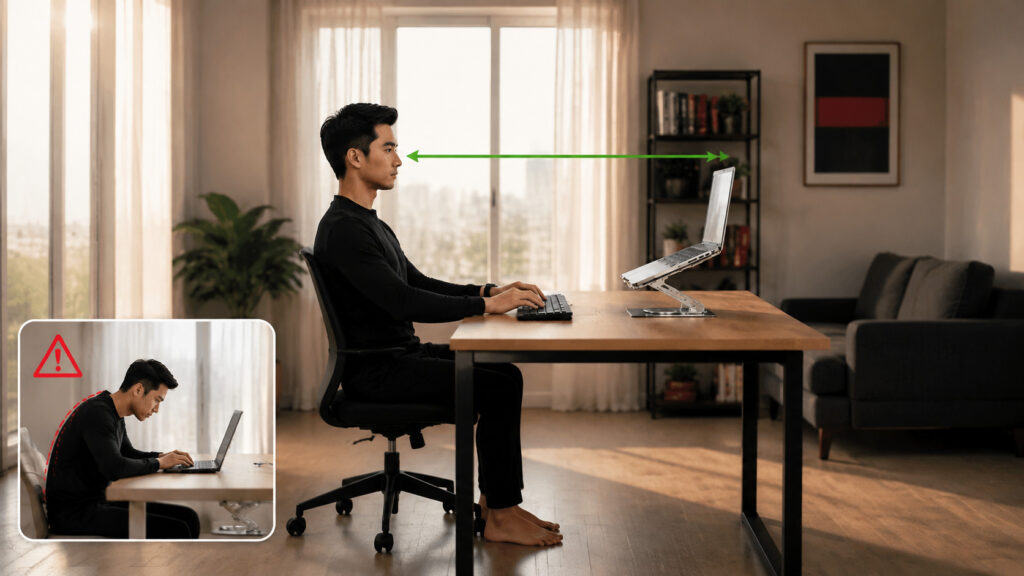
    A side-by-side comparison of good upright posture versus poor slumping posture at a computer desk.
    Correct vs Incorrect Desk Posture

    One of the biggest contributors is forward head posture, sometimes called tech neck.

    Instead of your ears aligning over your shoulders, your head gradually moves forward while looking at a screen.

    This small change dramatically increases the load on your neck muscles because they must support the weight of your head farther away from your body’s natural center of gravity.

    Common signs include:

    • Chin jutting forward
    • Rounded shoulders
    • Tight neck muscles
    • Frequent headaches
    • Upper back discomfort

    2. Poor Workstation Ergonomics

    Even good posture becomes difficult when your workstation encourages unhealthy positions.

    Common ergonomic mistakes include:

    • Monitor positioned too low
    • Laptop used without a stand
    • Keyboard placed too far away
    • Mouse positioned outside a comfortable reach
    • Chair without adequate lumbar support
    • Feet not resting flat on the floor

    When your equipment doesn’t fit your body, your body adapts—and usually not in a healthy way.

    3. Sitting Too Long Without Movement

    The human body was designed for movement.

    Remaining seated for hours causes muscles to tighten, circulation to slow, and joints to become stiff.

    Even a perfectly designed workstation cannot compensate for sitting all day.

    Regular movement breaks are essential for maintaining healthy muscles and reducing accumulated tension.

    4. Laptop Use

    Working directly from a laptop often creates a compromise.

    If the screen is at eye level, the keyboard becomes too high.

    If the keyboard is comfortable, the screen is too low.

    This forces many people to tilt their heads downward for hours, placing unnecessary stress on the cervical spine.

    A laptop stand combined with an external keyboard and mouse is usually a much healthier long-term solution.

    5. Stress and Muscle Tension

    Not all neck pain comes from posture alone.

    Stress naturally increases muscle tension, especially around the neck and shoulders.

    When deadlines pile up or workloads become overwhelming, many people unconsciously shrug their shoulders or tighten their neck muscles without realizing it.

    Learning to manage stress is therefore an important part of long-term neck health.

    Common Symptoms of Desk-Related Neck Pain

    Neck pain doesn’t always begin with severe discomfort.

    It often develops gradually.

    Common symptoms include:

    • Neck stiffness
    • Aching muscles
    • Shoulder tightness
    • Upper back pain
    • Reduced range of motion
    • Pain when turning your head
    • Tension headaches
    • Muscle fatigue after computer work

    If these symptoms appear regularly, it’s time to evaluate your workstation and daily habits rather than simply treating the pain.

    The Foundation of Neck Pain Relief: Ergonomics

    A worker sitting in an ergonomic chair with neutral posture using neck pain relief strategies for desk workers.
    ergonomic-desk-setup-for-neck-pain-relief.jpg

    Before buying expensive equipment or searching for advanced exercises, optimize the way you work.

    A few simple adjustments can dramatically reduce unnecessary strain.

    Keep Your Monitor at Eye Level

    Your monitor should be:

    • Directly in front of you
    • About an arm’s length away
    • Positioned so the top of the screen is at or slightly below eye level

    This allows your neck to remain in a neutral position instead of constantly looking downward.

    Sit With Proper Posture

    Good posture doesn’t mean sitting rigidly. Instead:

    • Keep your ears aligned over your shoulders.
    • Relax your shoulders.
    • Support your lower back.
    • Sit with your hips at the back of the chair.
    • Keep both feet flat on the floor.
    • Bend your knees at roughly 90 degrees.

    Think of maintaining a balanced position rather than forcing yourself perfectly upright all day.

    Position Your Keyboard and Mouse Correctly

    Your keyboard and mouse should allow your arms to remain relaxed.

    Aim for:

    • Elbows close to your body
    • Forearms roughly parallel to the floor
    • Wrists in a neutral position
    • Shoulders relaxed

    Small adjustments here can significantly reduce tension throughout your neck and upper back.

    Use an Ergonomic Chair

    A quality chair should support your body’s natural curves.

    Look for features such as:

    • Adjustable height
    • Lumbar support
    • Adjustable armrests
    • Comfortable seat depth
    • Stable back support

    Remember, however, that even the best chair cannot replace regular movement.

    Daily Habits That Prevent Neck Pain

    A desk worker standing up to take a quick shoulder movement break at a standing desk setup.
    Standing Movement Break for Posture

    Healthy work habits matter just as much as ergonomic equipment.

    Take Regular Movement Breaks

    One of the simplest—and most effective—strategies is to avoid sitting continuously.

    A helpful guideline is to stand, stretch, or walk briefly every 30–60 minutes.

    These short breaks improve circulation, reduce muscle fatigue, and give your neck and shoulders a chance to reset.

    Even a one-minute movement break is better than none.

    Follow the 20-20-20 Rule

    While primarily recommended for reducing eye strain, the 20-20-20 Rule also encourages healthy posture changes.

    Every 20 minutes:

    • Look at something about 20 feet away
    • For at least 20 seconds

    This brief pause reminds you to relax your shoulders, adjust your posture, and reduce screen-related fatigue.

    Stay Hydrated

    Muscles function more effectively when your body is properly hydrated.

    Although drinking water alone won’t eliminate neck pain, staying hydrated supports overall muscle function and encourages natural movement as you get up to refill your water bottle.

    Manage Daily Stress

    Stress often manifests physically.

    Simple habits such as:

    • Deep breathing
    • Mindfulness
    • Short walks
    • Stretch breaks
    • Relaxation exercises

    Can help reduce muscle tension before it builds into persistent discomfort.

    The Best Neck Stretches for Desk Workers

    A desk worker gently tilting his head to perform a side neck stretch for muscle relief.
    Gentle Neck Stretch for Desk Workers

    Stretching is one of the quickest ways to reduce muscle tension after long periods of computer work. The key is to stretch gently, never force a movement or stretch to the point of sharp pain.

    Aim to perform these stretches every 30–60 minutes during your workday or whenever you begin to feel stiffness.

    1. Chin Tucks

    One of the best exercises for correcting forward head posture.

    How to do it

    1. Sit or stand upright.
    2. Look straight ahead.
    3. Pull your chin straight backward as if making a “double chin.”
    4. Keep your eyes level.
    5. Hold for 5 seconds.
    6. Repeat 10 times.

    Benefits

    • Improves posture
    • Strengthens deep neck muscles
    • Reduces pressure on the cervical spine
    • Helps reverse “tech neck”

    2. Neck Side Stretch

    This stretch targets muscles that tighten during prolonged computer work.

    How to do it

    • Sit tall.
    • Slowly tilt your head toward your right shoulder.
    • Keep the opposite shoulder relaxed.
    • Hold for 20–30 seconds.
    • Repeat on the opposite side.

    Benefits

    • Reduces stiffness
    • Improves flexibility
    • Relieves muscle tightness

    3. Shoulder Rolls

    Shoulder tension and neck pain often occur together.

    Steps

    • Lift both shoulders.
    • Roll them backward slowly.
    • Continue for 10 repetitions.
    • Reverse the direction.

    This simple movement improves circulation and reduces muscle fatigue.

    4. Upper Trapezius Stretch

    The upper trapezius muscles become tight after hours of typing.

    Steps

    • Sit upright.
    • Hold the side of your chair with one hand.
    • Tilt your head toward the opposite shoulder.
    • Apply gentle pressure using your free hand.
    • Hold for 30 seconds.

    Repeat on both sides.

    5. Levator Scapulae Stretch

    Many people describe this as the stretch that provides the fastest relief.

    Steps

    1. Turn your head about 45 degrees.
    2. Look toward your armpit.
    3. Gently pull your head downward.
    4. Hold for 20–30 seconds.

    This stretch targets the muscle connecting your neck to your shoulder blade.

    6. Shoulder Blade Squeezes

    Poor posture often weakens the muscles between your shoulder blades.

    Exercise

    • Sit upright.
    • Pull your shoulder blades together.
    • Hold for 5 seconds.
    • Repeat 10–15 times.

    Strong upper-back muscles help reduce strain on the neck.

    Strengthening Exercises for Long-Term Relief

    Stretching reduces tightness.

    Strengthening helps prevent it from coming back.

    Adding these exercises two or three times per week can improve posture and make your neck more resilient.

    Resistance Band Rows

    Strengthens:

    • Upper back
    • Rear shoulders
    • Postural muscles

    Perform 2–3 sets of 10–15 repetitions.

    Wall Angels

    Stand against a wall with your back, head, and hips touching it.

    Slowly raise and lower your arms while maintaining contact with the wall.

    This improves shoulder mobility and posture.

    Thoracic Extensions

    The upper back often becomes rounded during desk work.

    Thoracic extension exercises restore mobility and reduce the workload placed on your neck.

    Core Strengthening

    Good posture starts with a stable core.

    Simple exercises such as:

    • Planks
    • Bird Dogs
    • Dead Bugs

    Can indirectly reduce neck pain by improving overall spinal support.

    Build a Neck-Friendly Workspace

    Visual diagram showing how to position a computer monitor at eye level to prevent neck strain.
    Monitor Height Adjustment for Neck Strain

    Even the best exercises won’t help if your workstation encourages poor posture all day.

    Use this checklist.

    Your Monitor

    ✓ Directly in front of you
    ✓ Top of screen at eye level
    ✓ About an arm’s length away

    Your Chair

    ✓ Adjustable height
    ✓ Lumbar support
    ✓ Feet flat on the floor
    ✓ Knees near 90 degrees

    Your Keyboard

    ✓ Close to your body
    ✓ Elbows around 90 degrees
    ✓ Wrists neutral

    Your Mouse

    ✓ Within easy reach
    ✓ Avoid stretching your shoulder forward

    Laptop Users

    If you work primarily on a laptop:

    • Use a laptop stand.
    • Connect an external keyboard.
    • Use an external mouse.

    This simple setup significantly reduces neck strain.

    Healthy Daily Habits That Protect Your Neck

    Long-term neck health is about more than posture.

    Small lifestyle habits also matter.

    Sleep Position

    A supportive pillow helps maintain your neck’s natural alignment.

    Sleeping on your back or side is generally more neck-friendly than sleeping on your stomach, which often forces your neck into a rotated position for hours.

    Stay Physically Active

    Regular walking, swimming, yoga, or strength training improves circulation, flexibility, and muscle endurance.

    The more active your body is, the better it tolerates long periods of desk work.

    Reduce Smartphone Time

    Many people improve their computer posture but spend hours looking down at their phones.

    Try to:

    • Hold your phone closer to eye level.
    • Avoid scrolling with your head bent forward.
    • Take regular breaks from handheld devices.

    Manage Stress

    Mental stress often causes physical tension.

    Simple techniques include:

    • Deep breathing
    • Meditation
    • Mindfulness
    • Short walks
    • Relaxing music

    Reducing stress helps prevent unnecessary tightening of the neck and shoulder muscles.

    Common Mistakes That Make Neck Pain Worse

    Avoid these habits if you want lasting relief.

    Ignoring Early Symptoms.

    Minor stiffness is often your body’s first warning sign.

    Addressing discomfort early is much easier than treating chronic pain later.

    Sitting for Hours Without Moving

    No chair can protect your neck if you remain still all day.

    Movement is essential.

    Stretching Too Aggressively

    Stretching should feel comfortable—not painful.

    Avoid jerking or forcing your neck beyond its natural range of motion.

    Using a Laptop on Your Lap

    This almost guarantees poor neck posture.

    Raise your screen whenever possible.

    Looking Down at Your Phone Constantly

    This habit contributes to “tech neck” and places unnecessary strain on the cervical spine.

    Depending Only on Pain Medication

    Pain relievers may temporarily reduce discomfort, but they don’t address the underlying causes such as poor posture, muscle weakness, or an inadequate workstation.

    Long-term improvement comes from correcting these contributing factors.

    When Should You See a Doctor?

    Most desk-related neck pain improves with ergonomic adjustments, movement, and exercise.

    However, seek medical advice if you experience:

    • Pain lasting more than 2–3 weeks
    • Pain that continues to worsen
    • Numbness or tingling in your arms or hands
    • Weakness in your arms
    • Severe headaches associated with neck pain
    • Pain following an accident or injury
    • Difficulty moving your neck
    • Pain that interferes with sleep or daily activities

    Prompt evaluation can help identify conditions that require targeted treatment beyond self-care.

    Your Daily 5-Minute Neck Relief Routine

    Use this routine during your workday:

    Minute 1

    • Stand up.
    • Walk around your workspace.

    Minute 2

    Perform:

    • Chin Tucks × 10

    Minute 3

    Perform:

    • Neck Side Stretch

    20 seconds each side

    Minute 4

    Perform:

    • Shoulder Rolls × 10
    • Shoulder Blade Squeezes × 10

    Minute 5

    • Deep breathing
    • Reset your posture
    • Drink water
    • Return to work

    Repeating this routine several times throughout the day can make a noticeable difference in how your neck feels by the end of the workday.

    Recommended Ergonomic Products

    While habits matter most, the right equipment can support better posture.

    Consider:

    ProductBenefit
    Adjustable Ergonomic ChairSupports the natural curve of the spine
    Laptop StandRaises the screen to eye level
    External KeyboardAllows comfortable arm positioning
    External MouseReduces shoulder and wrist strain
    Standing DeskEncourages alternating between sitting and standing
    Monitor ArmMakes screen-height adjustment easier
    FootrestSupports proper lower-body posture
    Ergonomic KeyboardPromotes a more natural wrist position

    Choose products that fit your workspace and needs rather than assuming expensive equipment alone will solve the problem. 

    Final Thoughts

    The most effective neck pain relief strategies don’t rely on a single stretch, expensive chair, or quick fix. They come from combining good ergonomics, regular movement, targeted exercises, and healthy daily habits.

    Small adjustments, raising your monitor, taking brief movement breaks, strengthening your postural muscles, and staying mindful of your posture, can significantly reduce neck strain over time.

    Think of neck health as an ongoing investment rather than a one-time solution. The habits you build today can help you stay comfortable, productive, and pain-free throughout your career, whether you work from home, in an office, or anywhere in between.

    Key Takeaways

    • Most desk-related neck pain results from poor posture, prolonged sitting, and inadequate workstation ergonomics.
    • A properly positioned monitor, ergonomic chair, and well-placed keyboard reduce unnecessary strain on the neck.
    • Regular movement breaks are essential—even the best workstation cannot replace movement.
    • Chin tucks, shoulder blade squeezes, and gentle neck stretches improve posture and mobility.
    • Strengthening the upper back, shoulders, and core supports long-term neck health.
    • Laptop users should consider a stand, external keyboard, and mouse for a more ergonomic setup.
    • Stress management and healthy sleep posture contribute to reducing muscle tension and recurring pain.
    • Address mild symptoms early to prevent chronic discomfort.
    • Seek medical evaluation if pain persists, worsens, or is accompanied by neurological symptoms.
    • Consistency with healthy habits is the most effective strategy for lasting neck pain relief.

    Disclaimer

    This article is intended for educational and informational purposes only and should not be considered medical advice. Mild neck discomfort caused by desk work often improves with ergonomic adjustments, regular movement, and appropriate exercises. However, if you experience severe or persistent neck pain, numbness, tingling, weakness, pain following an injury, or symptoms that interfere with daily activities, consult a qualified healthcare professional for an accurate diagnosis and personalized treatment plan.

  • Work-Life Balance Tips for Freelancers to Prevent Burnout and Thrive

    Work-Life Balance Tips for Freelancers to Prevent Burnout and Thrive

    How Can Freelancers Improve Work-Life Balance?

    Freelancers can improve work-life balance by:

    Setting fixed working hours and avoiding unnecessary after-hours work.Creating a dedicated workspace to separate work from relaxation. Using time blocking to organize focused work, meetings, and breaks. Setting clear client boundaries for response times, communication, and project scope. Taking regular breaks to maintain focus and reduce mental fatigue. Protecting sleep and physical health instead of constantly working longer hours. Automating repetitive tasks and outsourcing low-value work when appropriate. Scheduling personal time and vacations just as seriously as client commitments.

    Recognizing early burnout signs and adjusting workload before exhaustion becomes severe. The goal isn’t to work fewer hours, it is to create a sustainable work routine that supports your clients, business, health, and personal life.
    Unlike traditional employees, freelancers wear many hats. Beyond client work, you’re also responsible for:

    • Finding new clients
    • Sending proposals
    • Managing invoices
    • Marketing your services
    • Handling taxes and finances
    • Learning new skills
    • Running your business

    Without a system to manage these responsibilities, it’s easy to feel like you’re working all the time.

    Why Work-Life Balance Matters for Freelancers

    Many freelancers start their careers seeking more freedom. Ironically, they often end up working longer hours than they did in full-time employment. When every hour can potentially generate income, taking a break may feel like losing money. Over time, this mindset creates a cycle of overworking that affects both your health and your business.

    A healthy work-life balance helps you:

    • Produce higher-quality work
    • Improve focus and creativity
    • Reduce stress and anxiety
    • Build stronger client relationships
    • Maintain better physical health
    • Protect your mental well-being
    • Create a sustainable freelance career

    Remember, clients don’t pay you for the number of hours you work—they pay for the value you provide.

    The Hidden Cost of Freelancer Burnout

    Burnout doesn’t happen overnight. It develops gradually through weeks or months of excessive workloads, constant availability, and insufficient rest. Common causes include:

    • Saying yes to every project
    • Working without fixed hours
    • Checking emails all day
    • Constant client interruptions
    • Unrealistic deadlines
    • Financial pressure
    • Lack of exercise
    • Poor sleep habits

    Burnout affects more than your mood. It reduces creativity, increases mistakes, lowers motivation, and can damage your professional reputation if deadlines or quality begin to slip. Think of burnout like driving a car without ever refueling. Eventually, no matter how powerful the engine is, it stops.

    Signs You’re Heading Toward Burnout

    An exhausted freelancer sitting at a computer desk, recognizing warning signs of burnout.
    Recognizing Freelancer Burnout Warning Signs

    Recognizing burnout early makes it much easier to recover before it becomes a serious problem.

    Emotional Signs

    You may notice:

    • Feeling overwhelmed every morning
    • Losing enthusiasm for client projects
    • Becoming impatient with clients
    • Increased anxiety
    • Difficulty relaxing after work
    • Constant guilt when taking breaks

    Physical Symptoms

    Your body often sends warning signals first.

    These may include:

    • Frequent headaches
    • Neck and shoulder pain
    • Eye strain
    • Persistent fatigue
    • Poor sleep quality
    • Digestive issues
    • Low energy throughout the day

    Productivity Warning Signs

    Ironically, working longer hours usually produces worse results.

    Watch for:

    • Missing deadlines
    • Difficulty concentrating
    • Procrastination
    • Spending hours on simple tasks
    • Forgetting important details
    • Reduced creativity
    • Constant multitasking

    If several of these symptoms sound familiar, it’s time to adjust your work habits, not simply work harder.

    15 Practical Work-Life Balance Tips for Freelancers

    The following strategies are used by many successful freelancers to stay productive while protecting their health and personal lives.

    1. Create Fixed Working Hours

    One of the biggest mistakes freelancers make is being available 24/7. Instead of working whenever clients send messages, establish consistent office hours.

    For example:

    Monday–Friday

    • 9:00 AM – 5:30 PM

    or

    • 7:00 AM – 3:00 PM

    Choose hours that match your natural energy levels. If you’re most creative in the morning, schedule your demanding work during those hours. If you’re more productive in the evening, build your routine around that. The important thing is consistency. Once your workday ends, stop checking work emails and client messages unless it’s a genuine emergency.

    Pro Tip: Add your working hours to your website, email signature, and client onboarding documents so expectations are clear from the beginning.

    2. Build a Dedicated Workspace

    Your environment has a huge impact on your productivity. Working from bed or the couch may feel comfortable at first, but it often blurs the line between work and relaxation. A dedicated workspace tells your brain:

    “This is where work happens.”

    Your workspace doesn’t need to be expensive.

    A productive setup should include:

    • Comfortable chair
    • Proper desk
    • Good lighting
    • Reliable internet
    • External monitor if possible
    • Minimal distractions
    • Ergonomic keyboard and mouse

    Natural light can also improve mood, reduce eye strain, and help maintain your body’s natural sleep cycle. If working from home becomes distracting, consider spending a few hours each week in a coworking space or quiet café.

    3. Use Time Blocking Instead of To-Do Lists

    A freelancer using time blocking techniques to organize daily client work and rest periods.
    Time Blocking Schedule for Freelancers

    A long to-do list can quickly become overwhelming. Instead, assign specific blocks of time to each type of work.

    Example:

    TimeTask
    8:00–10:00Deep client work
    10:00–10:20Break
    10:20–12:00Project completion
    12:00–1:00Lunch
    1:00–2:00Meetings
    2:00–3:00Emails
    3:00–5:00Marketing & Admin

    Time blocking helps you:

    • Reduce decision fatigue
    • Stay focused
    • Avoid multitasking
    • Complete important work earlier
    • Protect personal time

    Instead of wondering what to do next, your calendar already has the answer.

    4. Prioritize Deep Work

    Not all working hours are equally productive. Responding to emails every few minutes destroys concentration and slows progress. Reserve uninterrupted blocks of time for your most valuable work.

    During deep work sessions:

    • Turn off notifications.
    • Close unnecessary browser tabs.
    • Silence your phone.
    • Avoid checking social media.
    • Focus on one task until completion.

    Even two hours of distraction-free work can produce more results than six hours of constant interruptions.

    5. Set Clear Client Boundaries

    Many freelancers fear saying “no” because they worry about losing clients. In reality, professional boundaries usually increase respect—not reduce it. From the start of every project, communicate:

    • Your working hours
    • Response times
    • Revision policy
    • Project scope
    • Preferred communication channel
    • Emergency contact expectations

    For example:

    “I typically respond to emails within one business day during my office hours (Monday–Friday, 9 AM–5 PM).” Clear expectations prevent misunderstandings and reduce unnecessary stress. Clients value reliability more than constant availability.

    6. Learn to Say No Without Feeling Guilty

    Every project you accept consumes time, energy, and attention. Saying yes to everything often means saying no to your health, family, or existing clients. Before accepting new work, ask yourself:

    • Do I have enough time?
    • Does this fit my expertise?
    • Is the budget worthwhile?
    • Will this delay existing projects?
    • Does this client align with my long-term goals?

    Turning down a project professionally today can protect your reputation tomorrow. A simple response like this is often enough:

    “Thank you for thinking of me. Unfortunately, my current schedule won’t allow me to deliver the quality you deserve, so I’ll have to decline this opportunity.”

    Professional freelancers don’t accept every opportunity, they choose the right ones.

    7. Plan Tomorrow Before Today Ends

    One of the simplest ways to reduce stress is to avoid starting each morning wondering what to do first. Before ending your workday, spend 10–15 minutes preparing for tomorrow. Review unfinished tasks, check upcoming deadlines, and identify your top priorities.

    A simple planning routine can include:

    • Reviewing today’s progress
    • Listing tomorrow’s three most important tasks
    • Preparing files or documents you’ll need
    • Blocking time on your calendar
    • Confirming upcoming meetings

    Starting your day with a clear plan reduces decision fatigue and allows you to begin productive work immediately.
    Pro Tip: Follow the “Rule of Three.” Instead of creating a long task list, identify the three tasks that will have the greatest impact on your business.

    8. Take Intentional Breaks Throughout the Day

    Many freelancers believe working continuously leads to higher productivity. In reality, your brain needs regular recovery periods to stay focused. Working for hours without a break often results in slower thinking, more mistakes, and lower-quality work. Try scheduling short breaks throughout your day.

    Some effective break ideas include:

    • Taking a short walk
    • Stretching your body
    • Drinking water
    • Practicing deep breathing
    • Looking away from your screen
    • Listening to relaxing music

    You can also use the Pomodoro Technique, which involves:

    • 25 minutes of focused work
    • 5-minute break

    After four sessions, take a longer 20–30 minute break. These small pauses help maintain energy and improve concentration throughout the day.

    9. Make Your Physical Health a Business Priority

    Your body is your most valuable business asset. If your health declines, your productivity, creativity, and earning potential often decline with it. Healthy habits don’t require spending hours in a gym.

    Focus on consistent actions such as:

    • Walking every day
    • Stretching between work sessions
    • Drinking enough water
    • Eating balanced meals
    • Improving posture
    • Limiting excessive caffeine

    Regular movement also reduces back pain, neck strain, and fatigue—common issues for freelancers who spend long hours at a computer. Remember, taking care of yourself isn’t time away from work, it’s an investment in your business.

    10. Protect Your Sleep Schedule

    Late-night work sessions may seem productive, but consistently sacrificing sleep often reduces your performance the following day.

    Sleep supports:

    • Memory
    • Creativity
    • Decision-making
    • Problem-solving
    • Emotional regulation

    Instead of working until midnight every evening, establish a consistent bedtime. Helpful sleep habits include:

    • Finishing work at least one hour before bed
    • Avoiding screens before sleeping
    • Keeping your bedroom cool and quiet
    • Following the same sleep schedule every day

    A well-rested freelancer usually produces better work in fewer hours than someone running on exhaustion.

    11. Reduce Digital Distractions

    Freelancers spend most of their day online, making distractions almost unavoidable. Every notification, social media check, or unnecessary email interrupts your focus and forces your brain to switch contexts.

    To reduce distractions:

    • Turn off non-essential notifications.
    • Keep your phone out of reach during deep work.
    • Close unused browser tabs.
    • Schedule specific times for checking email.
    • Log out of distracting websites while working.

    Small improvements in focus can save several hours every week.

    12. Automate Repetitive Tasks

    Not every task requires your personal attention. Many routine activities can be automated, allowing you to spend more time on high-value work.

    Consider automating:

    • Invoice reminders
    • Appointment scheduling
    • Proposal templates
    • Client onboarding
    • File backups
    • Social media scheduling
    • Email responses

    Automation doesn’t replace your expertise, it simply removes repetitive work from your schedule. The less time you spend on administration, the more time you have for meaningful work and personal life.

    13. Outsource Low-Value Activities

    Many freelancers believe they must do everything themselves. As your business grows, this mindset becomes a major obstacle.

    Ask yourself:

    “Am I the best person to do this task?”

    If the answer is no, consider outsourcing. Common tasks freelancers delegate include:

    • Bookkeeping
    • Graphic design
    • Video editing
    • Administrative work
    • Research
    • Data entry
    • Social media scheduling

    Outsourcing allows you to focus on work that generates the highest return while reducing stress and preventing overload.

    14. Schedule Personal Time Like Client Meetings

    Many freelancers carefully schedule client meetings but leave personal time to chance. Unfortunately, unscheduled personal time often disappears under additional work. Treat personal activities as non-negotiable appointments.

    Schedule time for:

    • Exercise
    • Family
    • Reading
    • Hobbies
    • Prayer or meditation
    • Outdoor activities
    • Friends
    • Relaxation

    A balanced life doesn’t happen accidentally, it requires intentional planning.

    15. Take Real Vacations Without Feeling Guilty

    Many freelancers proudly claim they never take vacations. In reality, constantly working without extended breaks increases the risk of burnout and reduces long-term productivity.

    Plan vacations in advance by:

    • Informing clients early
    • Finishing projects before leaving
    • Setting automatic email replies
    • Pausing notifications
    • Avoiding work during your time off whenever possible

    Rest isn’t a reward for success, it is part of what makes long-term success possible.

    A Sample Freelancer Daily Routine

    A freelancer writing in a daily planner to maintain a healthy work-life balance schedule.
    Healthy Freelancer Daily Routine Schedule

    The perfect routine looks different for everyone, but having structure makes it easier to balance work and life.

    TimeActivity
    7:00 AMWake up and hydrate
    7:30 AMExercise or walk
    8:00 AMBreakfast
    8:30 AMPlan the day
    9:00 AMDeep work session
    11:00 AMShort break
    11:15 AMClient projects
    1:00 PMLunch
    2:00 PMMeetings and emails
    3:00 PMMarketing or business development
    4:00 PMAdministrative tasks
    5:00 PMPlan tomorrow
    5:30 PMEnd work
    EveningFamily, hobbies, relaxation

    This routine is only a starting point. Adjust it based on your energy levels, responsibilities, and preferred working hours. 

    Productivity Tools That Help Freelancers Stay Balanced

    A graphic diagram showing the best productivity tools for freelancers to automate workflows.
    Best Productivity Tools for Freelancers

    The right tools won’t create work-life balance on their own, but they can simplify your workflow and reduce unnecessary stress.

    PurposeExamples
    Task ManagementTrello, Asana, ClickUp
    Time TrackingToggl Track, Clockify
    CalendarGoogle Calendar
    FocusForest, Freedom
    Note TakingNotion, Obsidian
    Password ManagementBitwarden, 1Password
    Cloud StorageGoogle Drive, Dropbox
    CommunicationSlack, Zoom

    Choose tools that solve real problems rather than adding unnecessary complexity to your workflow.

    Common Mistakes Freelancers Should Avoid

    Even experienced freelancers occasionally develop habits that undermine their work-life balance. Avoid these common mistakes:

    • Accepting every client request
    • Working without fixed hours
    • Skipping breaks
    • Constantly checking email
    • Ignoring physical health
    • Neglecting sleep
    • Working from bed every day
    • Failing to plan your workload
    • Not taking vacations
    • Measuring success only by hours worked

    Long-term freelance success comes from consistency, not constant hustle.

    Quick Checklist for Better Work-Life Balance

    Use this checklist to evaluate your current routine.

    ✅ I have consistent working hours.
    ✅ I stop working at the end of the day.
    ✅ I have a dedicated workspace.
    ✅ I schedule regular breaks.
    ✅ I communicate boundaries to clients.
    ✅ I exercise several times each week.
    ✅ I sleep consistently.
    ✅ I take time away from screens.
    ✅ I plan my work in advance.
    ✅ I regularly make time for family, hobbies, and rest.

    If you answered “no” to several of these, start by improving one habit at a time. Small, consistent changes often lead to lasting results.

    Final Thoughts

    Freelancing gives you the freedom to design a career around your life, but that freedom also requires discipline. A healthy work-life balance isn’t achieved by accident. It’s built through daily choices: setting boundaries, protecting your time, caring for your health, and focusing on meaningful work instead of constant busyness. You don’t need to overhaul your entire routine overnight. Start with one or two practical changes, stay consistent, and refine your habits as your business grows.

    The most successful freelancers aren’t the ones who work the longest hours. They’re the ones who create a sustainable way of working, one that supports their clients, their business, and their well-being for years to come.

  • Healthy Eating While Working From Home for Better Productivity

    Healthy Eating While Working From Home for Better Productivity

    Healthy eating while working from home means following a consistent meal routine, choosing balanced meals, staying hydrated, and limiting mindless snacking. Planning meals, eating away from your workspace, and prioritizing whole foods can improve focus, boost energy, and support long-term health and productivity. 

    Without a commute, scheduled lunch breaks, or coworkers stepping away for meals, it’s easy to develop unhealthy habits. You might grab a handful of chips between meetings, skip lunch because you’re busy, or keep refilling your coffee cup instead of drinking water. Over time, these small choices can affect your energy, concentration, mood, and overall productivity.

    The good news is that eating well while working remotely doesn’t require a complicated diet or expensive superfoods. A few intentional habits, such as planning meals, choosing balanced foods, and avoiding mindless snacking, can help you stay focused, productive, and healthier throughout the day.

    Whether you’re a freelancer, remote employee, entrepreneur, or digital nomad, this guide will show you practical ways to build a healthy eating routine that fits your work-from-home lifestyle.

    Quick Summary

    Healthy Eating While Working From Home at a Glance

    ✅ Follow a regular meal schedule instead of grazing all day.
    ✅ Prepare balanced meals with protein, fiber, healthy fats, and whole grains.
    ✅ Keep healthy snacks nearby and limit junk food at home.
    ✅ Stay hydrated and avoid relying on caffeine for energy.
    ✅ Practice mindful eating by stepping away from your workspace during meals.
    ✅ Meal prep and grocery planning make healthy choices easier on busy workdays.

    What Is Healthy Eating While Working From Home?

    Healthy eating while working from home means making intentional food choices that fuel your body and mind throughout the workday. Rather than eating whenever you’re bored or stressed, you follow a consistent eating routine that includes balanced meals, nutritious snacks, and adequate hydration.

    A healthy work-from-home diet focuses on:

    • Whole, minimally processed foods
    • Lean proteins
    • Fiber-rich fruits and vegetables
    • Whole grains
    • Healthy fats
    • Plenty of water

    At the same time, it encourages limiting foods and drinks high in added sugar, unhealthy fats, and excess sodium.

    The goal isn’t perfection—it’s consistency. Small improvements made every day often lead to better long-term health than following restrictive diets that are difficult to maintain.

    Why Healthy Eating Matters for Remote Workers

    Food is more than fuel. It directly affects how you think, feel, and perform throughout the day.

    When you choose balanced meals, your body receives a steady supply of nutrients that help regulate blood sugar, support brain function, and maintain energy. On the other hand, frequently relying on sugary snacks, skipping meals, or overeating can leave you feeling sluggish and distracted.

    Healthy eating while working from home can help you:

    • Maintain steady energy levels
    • Improve concentration and memory
    • Reduce afternoon energy crashes
    • Stay productive for longer periods
    • Support a healthy body weight
    • Strengthen your immune system
    • Improve mood and mental well-being

    Think of your body like a high-performance machine. Quality fuel helps it run efficiently, while poor-quality fuel often leads to inconsistent performance.

    The Link Between Nutrition and Productivity

    Many people blame poor productivity on workload or lack of motivation when nutrition may be part of the problem.

    Meals rich in lean protein, complex carbohydrates, healthy fats, and fiber release energy gradually, helping you stay focused during long work sessions.

    By contrast, foods high in refined sugar can cause a quick spike in blood sugar followed by a rapid drop, leaving you tired, hungry, and craving more snacks.

    Simple nutrition choices can have a noticeable impact on:

    • Decision-making
    • Creativity
    • Focus
    • Memory
    • Problem-solving
    • Mood
    • Overall work performance

    For freelancers and remote professionals, maintaining consistent energy can also improve client communication, meeting performance, and the quality of completed work.

    Common Nutrition Challenges When Working From Home

    Working remotely offers flexibility, but it also creates unique eating challenges.

    Recognizing these obstacles is the first step toward building healthier habits.

    1. Constant Access to the Kitchen

    Unlike a traditional office, your kitchen is only a few steps away.

    The constant visibility of food makes it easier to snack without thinking, especially during stressful tasks or moments of boredom.

    Sometimes you’re not actually hungry, you simply need a break from work.

    2. Mindless Snacking

    Many remote workers eat while answering emails, attending virtual meetings, or scrolling through social media.

    Because your attention is elsewhere, you may eat far more than your body actually needs.

    Mindless eating often leads to:

    • Larger portions
    • More calories
    • Less satisfaction
    • Frequent cravings

    3. Skipping Meals

    Busy schedules can make lunch feel optional.

    You may promise yourself you’ll eat “after this meeting,” only to realize it’s late afternoon and you’ve barely eaten all day.

    Skipping meals can result in:

    • Low energy
    • Poor concentration
    • Irritability
    • Overeating later in the day

    4. Too Much Coffee

    Coffee can improve alertness when consumed in moderation.

    However, relying on several large cups each day instead of eating balanced meals may contribute to:

    Moderation is key.

    5. Emotional Eating

    Remote work can sometimes feel isolating or stressful.

    Some people respond to stress, boredom, frustration, or loneliness by eating, even when they aren’t physically hungry.

    Learning to recognize emotional triggers helps you make more intentional choices instead of automatically reaching for snacks.

    Signs Your Current Eating Habits Are Hurting Productivity

    Your body often sends signals when your nutrition needs attention.

    You may notice:

    • Feeling tired before noon
    • Frequent afternoon crashes
    • Difficulty concentrating
    • Constant cravings for sugary foods
    • Feeling hungry shortly after meals
    • Drinking coffee just to stay awake
    • Regular headaches
    • Weight gain from frequent snacking
    • Low motivation during the workday

    If several of these sound familiar, improving your eating routine may have a greater impact than simply working longer hours.

    15 Healthy Eating Tips for Working From Home

    These practical strategies can help you build sustainable eating habits that support both your health and your productivity.

    1. Create a Consistent Meal Schedule

    One of the biggest advantages of office work is structure.

    When working remotely, that structure often disappears.

    Instead of eating whenever you remember or whenever you pass the kitchen, plan regular meal and snack times.

    For example:

    TimeMeal
    8:00 AMBreakfast
    10:30 AMHealthy snack
    1:00 PMLunch
    4:00 PMHealthy snack
    7:00 PMDinner

    Following a consistent eating schedule helps regulate hunger, maintain steady energy, and reduce unnecessary snacking.

    Treat your meals like important appointments in your calendar.

    2. Keep Your Workspace Away From the Kitchen

    The environment shapes behavior.

    If your desk faces the refrigerator or pantry, you’ll likely think about food more often.

    Whenever possible:

    • Work in a separate room.
    • Face away from the kitchen.
    • Avoid storing snacks on your desk.
    • Visit the kitchen only during planned meal breaks.

    Even creating a visual boundary between your workspace and eating area can reduce mindless trips to the fridge.

    3. Plan and Prepare Meals Ahead of Time

    A remote worker organizing healthy meal prep containers in the kitchen for the workweek.
    Meal Prep for Remote Workers and Freelancers

    Healthy decisions become much easier when the work is already done.

    Meal prep doesn’t mean cooking an entire week’s worth of food in one session.

    It can be as simple as:

    • Washing vegetables
    • Cooking extra chicken or tofu
    • Preparing overnight oats
    • Portioning healthy snacks
    • Cooking rice or quinoa in advance

    Having nutritious ingredients ready reduces the temptation to order fast food or reach for processed snacks during a busy day.

    4. Build Balanced Meals

    A balanced plate keeps you fuller longer and provides more stable energy throughout the day.

    Aim to include:

    • ½ plate: Vegetables
    • ¼ plate: Lean protein
    • ¼ plate: Whole grains or other high-fiber carbohydrates

    Complete the meal with healthy fats such as avocado, nuts, seeds, or olive oil.

    Examples include:

    • Grilled chicken with brown rice and roasted vegetables
    • Lentil salad with mixed greens and olive oil dressing
    • Whole-grain wrap with turkey, vegetables, and hummus
    • Stir-fried tofu with vegetables and quinoa

    Balanced meals help reduce cravings and support sustained productivity.

    5. Choose Healthy Snacks That Keep You Full

    Snacking isn’t the problem, poor snack choices are.

    Instead of reaching for cookies, chips, or candy, choose foods that combine protein and fiber for longer-lasting satisfaction.

    Healthy snack ideas include:

    • Greek yogurt with berries
    • Apple slices with peanut butter
    • Mixed nuts (in moderate portions)
    • Carrot sticks with hummus
    • Cottage cheese with fruit
    • Whole-grain crackers with tuna
    • Hard-boiled eggs
    • Roasted chickpeas

    These snacks provide more sustained energy than highly processed alternatives and can help you avoid overeating at your next meal.

    6. Stay Hydrated Throughout the Day

    Fatigue, headaches, and poor concentration are sometimes caused by dehydration rather than hunger.

    Keep a reusable water bottle on your desk and sip regularly throughout the day.

    Simple ways to drink more water include:

    • Refill your bottle every morning.
    • Drink a glass of water before each meal.
    • Add lemon, cucumber, or mint for flavor.
    • Choose water instead of sugary drinks whenever possible.

    Proper hydration supports brain function, helps regulate body temperature, and can reduce unnecessary snacking triggered by thirst.

    7. Limit Sugary Drinks and Energy Drinks

    When deadlines pile up, it can be tempting to reach for soda, sweetened coffee, or energy drinks. While they may provide a quick boost, they’re often followed by an energy crash that leaves you feeling even more tired.

    Instead, choose drinks that keep you hydrated without adding excessive sugar.

    Better options include:

    • Plain water
    • Sparkling water with lemon
    • Unsweetened tea
    • Herbal tea
    • Black coffee (in moderation)

    If you enjoy flavored drinks, try infusing water with cucumber, berries, mint, or citrus fruits for a refreshing alternative.

    8. Don’t Rely on Coffee for Energy

    Coffee can be part of a healthy routine, but it shouldn’t replace nutritious meals or adequate sleep.

    Too much caffeine may contribute to:

    • Jitters
    • Anxiety
    • Poor sleep quality
    • Digestive discomfort
    • Afternoon energy crashes

    For most healthy adults, moderate caffeine intake is generally considered safe, but individual tolerance varies.

    If you find yourself drinking coffee simply because you’re exhausted, ask yourself:

    • Did I eat breakfast?
    • Have I had enough water today?
    • Did I sleep well last night?

    Addressing the root cause often works better than another cup of coffee.

    9. Practice Mindful Eating

    Many people eat lunch while replying to emails or attending virtual meetings.

    The problem?

    Your brain is focused on work, not your meal. Mindful eating means giving your food your full attention.

    Try to:

    • Step away from your computer.
    • Sit at a table.
    • Eat slowly.
    • Chew thoroughly.
    • Notice flavors and textures.
    • Stop eating when comfortably full.

    Even a 20-minute lunch break can leave you feeling more refreshed than eating at your desk in five minutes.

    10. Control Portion Sizes

    Healthy foods can still be overeating. Instead of eating directly from a bag or container, portion your food before sitting down.

    A simple plate method works well:

    Plate PortionFood Type
    ½Vegetables
    ¼Lean protein
    ¼Whole grains or high-fiber carbohydrates

    This balanced approach supports steady energy while helping you avoid overeating.

    11. Cook More Meals at Home

    One of the biggest advantages of working remotely is having access to your own kitchen.

    Preparing meals at home gives you greater control over:

    • Ingredients
    • Portion sizes
    • Added sugar
    • Salt
    • Cooking oils

    Simple meals don’t need to be time consuming.

    Examples include:

    • Vegetable omelet with whole-grain toast
    • Grilled chicken salad
    • Lentil soup
    • Stir-fried vegetables with tofu
    • Baked salmon with roasted vegetables
    • Chickpea and quinoa bowls

    Cooking more often doesn’t require gourmet skills, it simply means making healthier choices more consistently.

    12. Keep Healthy Foods Visible

    Your environment influences your decisions more than willpower alone.

    If cookies are sitting on your desk while fruit is hidden in the refrigerator, guess which one you’re more likely to eat?

    Make healthy choices the easy choices.

    Try keeping:

    • Fresh fruit in a bowl
    • Cut vegetables in clear containers
    • Nuts in portion-sized containers
    • Greek yogurt at eye level in the refrigerator

    Meanwhile, store less nutritious snacks out of immediate sight or avoid buying them altogether if they’re difficult to resist.

    13. Never Skip Breakfast

    Breakfast helps replenish your body’s energy after an overnight fast and prepares you for the day ahead.

    A balanced breakfast can improve concentration and reduce mid-morning cravings.

    Healthy breakfast ideas include:

    • Oatmeal with berries and nuts
    • Greek yogurt with fruit and granola
    • Whole-grain toast with eggs
    • Smoothie with spinach, banana, oats, and yogurt
    • Cottage cheese with fruit
    • Peanut butter on whole-grain toast

    Choose meals that combine protein, fiber, and healthy fats to keep you satisfied longer.

    14. Plan Your Grocery Shopping

    Healthy eating often begins before you enter the kitchen, it starts at the grocery store.

    Shopping without a plan can lead to impulse purchases and fewer nutritious options at home.

    Before shopping:

    • Plan meals for the week.
    • Check what you already have.
    • Write a shopping list.
    • Buy plenty of fruits and vegetables.
    • Choose lean protein sources.
    • Stock whole grains.
    • Keep healthy snacks available.

    Planning ahead saves time, reduces food waste, and makes healthy eating easier throughout the week.

    15. Build Sustainable Habits Instead of Following Strict Diets

    Many people start with ambitious nutrition plans that are difficult to maintain.

    Long term success comes from consistency, not perfection.

    Rather than aiming for a “perfect” diet, focus on habits you can realistically continue.

    Examples include:

    • Drinking an extra glass of water each day
    • Adding vegetables to lunch
    • Preparing meals every Sunday
    • Replacing sugary drinks with water
    • Choosing fruit instead of candy several times a week

    Small improvements repeated consistently create lasting results.

    A Sample Healthy Work-From-Home Meal Plan

    A healthy work-from-home meal featuring grilled chicken, brown rice, and fresh vegetables on a balanced plate.
    Healthy Work From Home Meal Plan

    If you’re unsure where to start, this simple meal plan provides balanced nutrition throughout the day.

    TimeMeal
    8:00 AMOatmeal with berries, walnuts, and Greek yogurt
    10:30 AMApple with peanut butter
    1:00 PMGrilled chicken, brown rice, and mixed vegetables
    4:00 PMCarrot sticks with hummus
    7:00 PMBaked salmon, quinoa, and steamed broccoli

    Adjust portion sizes and food choices to suit your dietary needs, activity level, and personal preferences. 

    Healthy Snack Ideas for Busy Remote Workers

    An assortment of healthy snacks for working from home including berries, nuts, and yogurt.
    Healthy Snacks for Working From Home

    When hunger strikes between meals, choose snacks that provide lasting energy instead of quick sugar highs.

    Some nutritious options include:

    • Greek yogurt with fresh berries
    • Mixed nuts (portion controlled)
    • Fresh fruit
    • Cottage cheese with pineapple
    • Hard boiled eggs
    • Hummus with cucumber and carrots
    • Whole-grain crackers with tuna
    • Roasted chickpeas
    • Air popped popcorn
    • Homemade energy bites

    Aim for snacks that combine protein, fiber, or healthy fats to help keep you full until your next meal.

    Foods That Help Improve Focus and Productivity

    An educational diagram displaying top foods that improve focus and productivity for desk workers.
    Foods That Improve Focus and Productivity

    Certain foods provide nutrients that support steady energy and mental performance.

    FoodWhy It Helps
    OatsSlow-release carbohydrates for sustained energy
    EggsHigh quality protein and essential nutrients
    Greek yogurtProtein and calcium for satiety
    NutsHealthy fats and minerals
    SalmonRich in omega-3 fatty acids
    Leafy greensVitamins, minerals, and fiber
    BerriesNaturally rich in antioxidants
    Beans and lentilsProtein and fiber for stable energy
    Brown riceComplex carbohydrates that help avoid energy crashes
    WaterSupports hydration, concentration, and overall brain function

    No single food guarantees better productivity, but a balanced diet supports consistent performance over time. 

    Common Healthy Eating Mistakes Remote Workers Make

    Even with the best intentions, it’s easy to develop habits that work against your goals.

    Watch out for these common mistakes:

    • Skipping breakfast
    • Grazing throughout the day
    • Eating while working
    • Drinking too little water
    • Depending on coffee for energy
    • Ordering takeout too often
    • Keeping junk food within easy reach
    • Shopping without a grocery list
    • Ignoring portion sizes
    • Following unrealistic diet plans

    Recognizing these patterns is the first step toward changing them.

    Quick Daily Healthy Eating Checklist

    Use this checklist to build healthier work-from-home habits.

    ✅ I ate breakfast today.
    ✅ I drank enough water.
    ✅ I ate balanced meals.
    ✅ I included fruits or vegetables in my meals.
    ✅ I chose healthy snacks.
    ✅ I stepped away from my desk during meals.
    ✅ I limited sugary drinks.
    ✅ I avoided unnecessary snacking.
    ✅ I planned tomorrow’s meals.

  • Do Freelancers Need a VPN? Everything You Need to Know About Staying Secure Online

    Do Freelancers Need a VPN? Everything You Need to Know About Staying Secure Online

    Freelancing offers the freedom to work from almost anywhere, whether it’s your home office, a coworking space, a coffee shop, or while traveling abroad. However, that flexibility also brings new cybersecurity challenges. Connecting to public Wi-Fi, sharing confidential client files, and accessing online accounts from different locations can expose your personal and business data to unnecessary risks.
    One of the most common security tools recommended for remote professionals is a Virtual Private Network (VPN). But is it really necessary for every freelancer? The answer depends on how and where you work. Understanding what a VPN does—and what it doesn’t do—can help you make informed decisions about protecting your online privacy and your clients’ information.
    In this guide, you’ll learn how VPNs work, when freelancers should use one, their benefits and limitations, and how to choose the right VPN for your freelance business.

    Quick Summary

    • A VPN encrypts your internet connection to improve privacy and security.
    • Freelancers who work remotely or travel frequently face higher cybersecurity risks.
    • Using public Wi-Fi without protection can expose sensitive information.
    • A VPN helps protect client data but should be combined with other security practices.
    • Free VPNs often have limitations, while reputable paid VPNs generally offer stronger security and better performance.
    • A VPN is one part of a complete cybersecurity strategy—not a replacement for good digital habits.

    Do Freelancers Really Need a VPN?

    Not every freelancer has the same security needs. Someone working exclusively from a secured home network with minimal sensitive data faces different risks than a freelance web developer who regularly works from airports, cafés, or coworking spaces. A VPN isn’t mandatory for every freelancer, but it becomes increasingly valuable if you:

    • Frequently use public Wi-Fi.
    • Handle confidential client information.
    • Access business accounts while traveling.
    • Work with international clients.
    • Manage financial transactions online.
    • Use cloud storage for sensitive files.

    Think of a VPN as an additional layer of protection. It doesn’t make you immune to cyber threats, but it significantly reduces certain risks when combined with good cybersecurity habits.

    What Is a VPN?

    A Virtual Private Network (VPN) is a service that creates a secure, encrypted connection between your device and the internet. Normally, your internet traffic travels directly through your Internet Service Provider (ISP). When using a VPN, your data is encrypted before it leaves your device and is routed through a secure VPN server before reaching its destination.

    This process helps:

    • Protect your data from interception.
    • Hide your public IP address.
    • Improve online privacy.
    • Reduce risks on unsecured networks.

    A VPN doesn’t make you anonymous, but it makes it much harder for unauthorized parties to monitor your online activity.

    How Does a VPN Work?

    Understanding the basics helps you appreciate why VPNs are valuable for freelancers. Here’s a simplified version of what happens:

    1. You connect to a VPN server.
    2. The VPN encrypts your internet traffic.
    3. Your encrypted data travels securely through the VPN server.
    4. Websites and online services see the VPN server’s IP address instead of yours.
    5. Responses return through the encrypted connection to your device.

    Without a VPN:

    Your Device → Internet Provider → Website

    With a VPN:

    Your Device → Encrypted VPN Tunnel → VPN Server → Website

    This secure tunnel makes it significantly more difficult for attackers on the same network to intercept your internet traffic.

    Why Freelancers Face Greater Online Security Risks

    Freelancers often work in environments that traditional office employees don’t. Instead of one secured office network, freelancers may connect from:

    • Coffee shops
    • Airports
    • Hotels
    • Coworking spaces
    • Shared apartments
    • Client offices
    • International travel destinations

    Each new network introduces potential security concerns. Let’s examine some of the most common risks.

    A freelancer using a laptop on coffee shop public Wi-Fi with encrypted VPN protection.
    Public Wi-Fi Security for Freelancers

    Public Wi-Fi Risks

    Public Wi-Fi is convenient, but it isn’t always secure. On poorly secured networks, cybercriminals may attempt to intercept unencrypted traffic or trick users into connecting to fake Wi-Fi hotspots that mimic legitimate networks. Although many websites now use HTTPS encryption, public networks still present additional risks, making extra protection worthwhile when handling sensitive work.

    Protecting Client Data

    Freelancers regularly exchange:

    • Contracts
    • Design files
    • Financial documents
    • Login credentials
    • Business proposals
    • Source code
    • Marketing strategies

    Clients trust freelancers to protect this information. Using encrypted connections demonstrates professionalism and reduces unnecessary exposure when working outside trusted networks.

    International Travel

    Digital nomads and freelancers who travel frequently connect through unfamiliar networks in hotels, airports, and cafés. A VPN helps add an extra layer of protection while accessing work accounts or transferring files on networks you don’t control.

    Increased Phishing and Cyber Attacks

    Freelancers manage multiple online accounts, including:

    • Freelance marketplaces
    • Email
    • Cloud storage
    • Payment platforms
    • Project management tools
    • Video conferencing software

    The more accounts you use, the greater your exposure to phishing attempts and credential theft. While a VPN cannot prevent phishing, it complements other security measures as part of a broader cybersecurity strategy.

    An infographic displaying the main benefits of using a VPN for freelancers working remotely.
    Benefits of a VPN for Freelancers

    Benefits of Using a VPN

    A VPN offers several advantages for freelancers who value privacy and security.

    1. Protects Data on Public Wi-Fi

    One of the biggest reasons freelancers use VPNs is to reduce the risks associated with unsecured wireless networks. Whether you’re sending invoices, uploading client files, or checking email, encryption helps protect sensitive information while connected to public Wi-Fi.

    2. Improves Online Privacy

    Your IP address reveals information about your approximate location and internet connection. A VPN masks your IP address, making it more difficult for websites, advertisers, and third parties to track your browsing activity.

    3. Encrypts Internet Traffic

    Encryption transforms readable data into unreadable code while it travels across the internet. Even if someone intercepts encrypted traffic, they cannot easily understand its contents without the appropriate decryption keys.

    4. Supports Secure Remote Work

    Many freelancers rely on cloud-based tools for collaboration.

    Examples include:

    • Cloud storage
    • Project management platforms
    • Online banking
    • Client portals
    • Accounting software

    Using a VPN adds another layer of protection while accessing these services from outside your home or office.

    5. Helps Maintain Client Trust

    Clients expect freelancers to protect confidential business information. Using appropriate cybersecurity tools—including a VPN where appropriate—demonstrates a professional approach to safeguarding sensitive data.

    6. Access Services While Traveling

    Some online services and websites vary by region or may be unavailable in certain countries. When used in accordance with local laws and the service’s terms of use, a VPN can help freelancers maintain secure access to work-related resources while traveling.

    Does Every Freelancer Need a VPN?

    Not necessarily. You may have a greater need for a VPN if you:

    • Frequently work on public Wi-Fi.
    • Travel regularly for work.
    • Handle confidential client information.
    • Access business systems remotely.
    • Manage sensitive financial data.

    If you work exclusively from a well-secured home network, use strong passwords, enable multi-factor authentication, and rarely access public networks, a VPN may be less critical—but it can still provide additional privacy and security.

    When Should Freelancers Definitely Use a VPN?

    While a VPN isn’t required for every online activity, there are situations where using one is strongly recommended. If your work involves sensitive information or unsecured networks, a VPN can significantly improve your online security.

    Working on Public Wi-Fi

    Public Wi-Fi networks in cafés, airports, hotels, libraries, and coworking spaces are convenient but often less secure than private networks. Although many websites encrypt their traffic using HTTPS, public networks may still expose you to additional risks, such as malicious hotspots or network monitoring. Using a VPN encrypts your internet connection, making it much more difficult for attackers on the same network to intercept your data.
    If you regularly work outside your home office, using a VPN whenever you connect to public Wi-Fi is a sensible security practice.

    Handling Confidential Client Information

    Freelancers frequently work with sensitive business information, including:

    • Contracts
    • Financial records
    • Marketing strategies
    • Source code
    • Customer databases
    • Login credentials
    • Confidential documents

    A VPN helps protect this information while it travels across the internet, reducing the risk of unauthorized interception.

    Traveling Internationally

    Digital nomads and freelancers often work from different countries. While traveling, you may connect through unfamiliar internet providers or hotel Wi-Fi networks. A VPN adds an extra layer of security and can help you access work-related services securely when traveling, provided you comply with local laws and the terms of service of the platforms you use.

    Accessing Business Accounts

    Many freelancers use online services such as:

    • Cloud storage
    • Accounting software
    • Project management platforms
    • Client portals
    • CRM systems
    • Online banking

    These accounts often contain valuable business information. A VPN helps secure your connection while accessing them, particularly on networks you don’t fully trust.

    A side-by-side diagram comparing free vs paid VPN options for remote freelancers.
    Free vs Paid VPN Comparison for Freelancers

    Free VPN vs. Paid VPN

    One of the biggest questions freelancers ask is whether a free VPN is enough. The answer depends on your security needs.

    Free VPN

    Free VPN services can be useful for occasional personal use, but they often come with limitations.

    Advantages

    • No subscription cost
    • Easy to install
    • Suitable for light browsing

    Limitations

    • Slower connection speeds
    • Data usage limits
    • Fewer server locations
    • Limited security features
    • Potential privacy concerns, depending on the provider

    Some free VPN providers may collect usage data or display advertisements to support their service. Always review a provider’s privacy policy before using it.

    Paid VPN

    Paid VPN services are generally a better choice for professionals who rely on secure, consistent internet access.

    Advantages

    • Faster speeds
    • Stronger encryption
    • More server locations
    • Better privacy policies
    • Advanced security features
    • Reliable customer support
    • Better performance for video calls and file transfers

    For freelancers handling client projects daily, a reputable paid VPN is often a worthwhile investment.

    How to Choose the Best VPN for Freelance Work

    Not all VPN services offer the same features. Instead of choosing based solely on price, evaluate each provider based on security, performance, and transparency. Here are the key features to look for.

    Strong Encryption

    Choose a VPN that uses modern encryption standards, such as AES-256, which is widely regarded as a strong encryption standard for protecting data in transit.

    No-Logs Policy

    A reputable VPN should clearly explain what information it collects and ideally follow a verified no-logs policy, meaning it does not store unnecessary records of your browsing activity.

    Kill Switch

    A kill switch automatically blocks internet access if the VPN connection unexpectedly drops. This helps prevent sensitive data from being transmitted over an unsecured connection.

    Fast Connection Speeds

    Freelancers frequently upload large files, attend video meetings, and collaborate in real time. A good VPN should provide reliable performance with minimal impact on connection speed.

    Global Server Network

    If you work with international clients or travel often, having access to servers in multiple countries can improve flexibility and connection reliability.

    Cross-Platform Compatibility

    Your VPN should work across the devices you use for work, including:

    • Windows
    • macOS
    • Linux
    • Android
    • iPhone and iPad

    Some providers also allow multiple simultaneous device connections under one subscription.

    A visual layout of essential cybersecurity best practices including MFA and strong passwords.
    Freelancer Cybersecurity Best Practices Checklist

    Additional Cybersecurity Tips for Freelancers

    A VPN is only one part of a strong cybersecurity strategy. To better protect your freelance business, combine it with these best practices.

    Use Strong, Unique Passwords

    Avoid reusing passwords across different accounts. Consider using a trusted password manager to generate and store strong, unique passwords securely.

    Enable Multi-Factor Authentication (MFA)

    Whenever possible, enable MFA on:

    • Email accounts
    • Freelance platforms
    • Cloud storage
    • Payment services
    • Banking apps
    • Project management tools

    MFA adds an extra verification step, making unauthorized access more difficult even if a password is compromised.

    Keep Software Updated

    Install security updates for:

    • Operating systems
    • Browsers
    • Antivirus software
    • VPN applications
    • Productivity tools

    Updates often fix security vulnerabilities that attackers may attempt to exploit.

    Back Up Important Files

    Maintain regular backups of your client work using secure cloud storage, external drives, or both. Following the 3-2-1 backup rule—three copies of your data, on two different types of storage, with one copy kept off-site—is a widely recommended practice.

    Watch for Phishing Attempts

    Be cautious when receiving:

    • Unexpected email attachments
    • Suspicious links
    • Login requests
    • Fake invoices
    • Urgent payment messages

    Always verify the sender before clicking links or sharing sensitive information.

    Common VPN Myths

    Misunderstandings about VPNs are common. Let’s separate fact from fiction.

    Myth 1: A VPN Makes You Completely Anonymous

    A VPN improves privacy by encrypting your connection and masking your IP address, but it does not make you completely anonymous online.

    Myth 2: VPNs Eliminate All Cybersecurity Risks

    False.

    A VPN cannot prevent phishing, malware infections, weak passwords, or unsafe downloads. It should be used alongside other cybersecurity best practices.

    Myth 3: Only Large Businesses Need VPNs

    Freelancers often handle valuable client information and work from various locations. Many independent professionals can benefit from the additional protection a VPN provides.

    Myth 4: VPNs Always Make the Internet Slow

    Using a VPN may slightly reduce connection speed because your traffic is encrypted and routed through another server. However, high-quality VPN providers typically minimize this impact, and many users notice little difference during everyday work.

    Final Thoughts

    Freelancers enjoy the flexibility to work from almost anywhere, but that freedom comes with added cybersecurity responsibilities. Whether you’re working from a café, an airport, a coworking space, or a hotel, protecting your internet connection should be part of your daily workflow.

    A VPN isn’t a magic solution, nor is it necessary for every freelancer in every situation. However, if you regularly use public Wi-Fi, handle confidential client data, travel frequently, or value online privacy, a VPN can provide meaningful protection against common online risks.

    The most effective approach is to treat a VPN as one layer of a broader security strategy. Combine it with strong passwords, multi-factor authentication, regular software updates, secure backups, and good cybersecurity habits. Together, these practices can help you protect your freelance business, maintain client trust, and work with greater confidence—wherever your projects take you.